Choosing Primary, Secondary & Background Colours
Open Studio → Website → Details → Branding. Scroll to Color Palette and Colors.
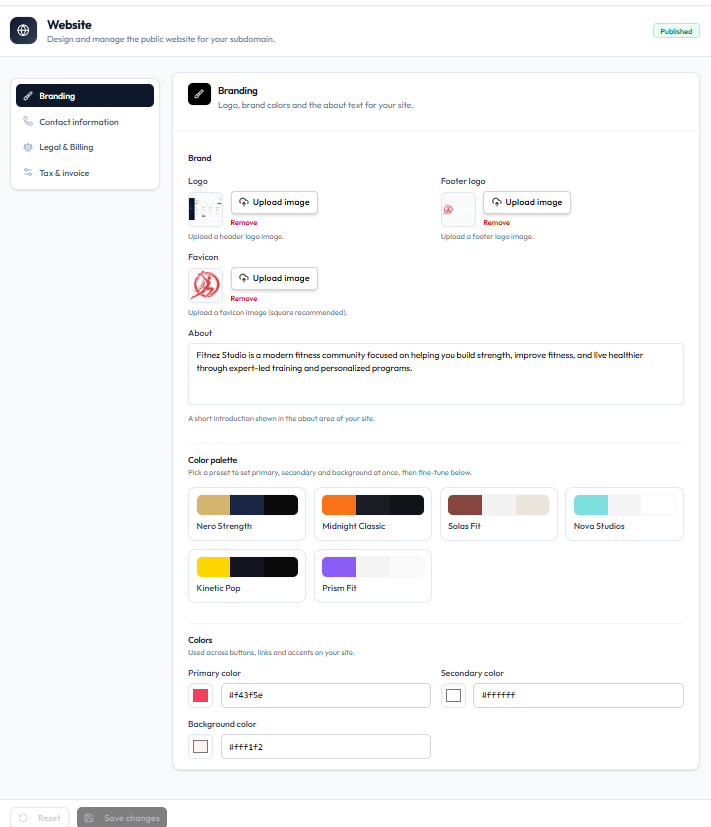
Color Palette
Heading: Pick a preset to set primary, secondary and background at once.
Presets on the capture:
- Nero Strength
- Midnight Classic
- Solas Fit
- Nova Studios
- Kinetic Pop
- Prism Fit
Colors
Fine-tune individual colours:
| Field | Example on capture |
|---|---|
| Primary color | #f43f5e |
| Secondary color | #ffffff |
| Background color | #fff1f2 |
Each field shows a colour swatch and a hex value. These colours are used for buttons, links, and accents on the public site.
Steps
Step 1 — Open Branding
Studio → Website → Details → Branding.
Step 2 — Pick a preset (optional)
Click a Color Palette preset to set all three colours at once.
Step 3 — Adjust colours
Edit Primary color, Secondary color, and Background color if needed.
Step 4 — Save
Click Save changes.
Related Articles
Last updated on