Class Roster
The class roster is the list of people on one session — who is booked, who is waiting, and attendance controls for that class.
From Today’s Schedule
Open Training → Booking → Today’s Schedule, then select the class.
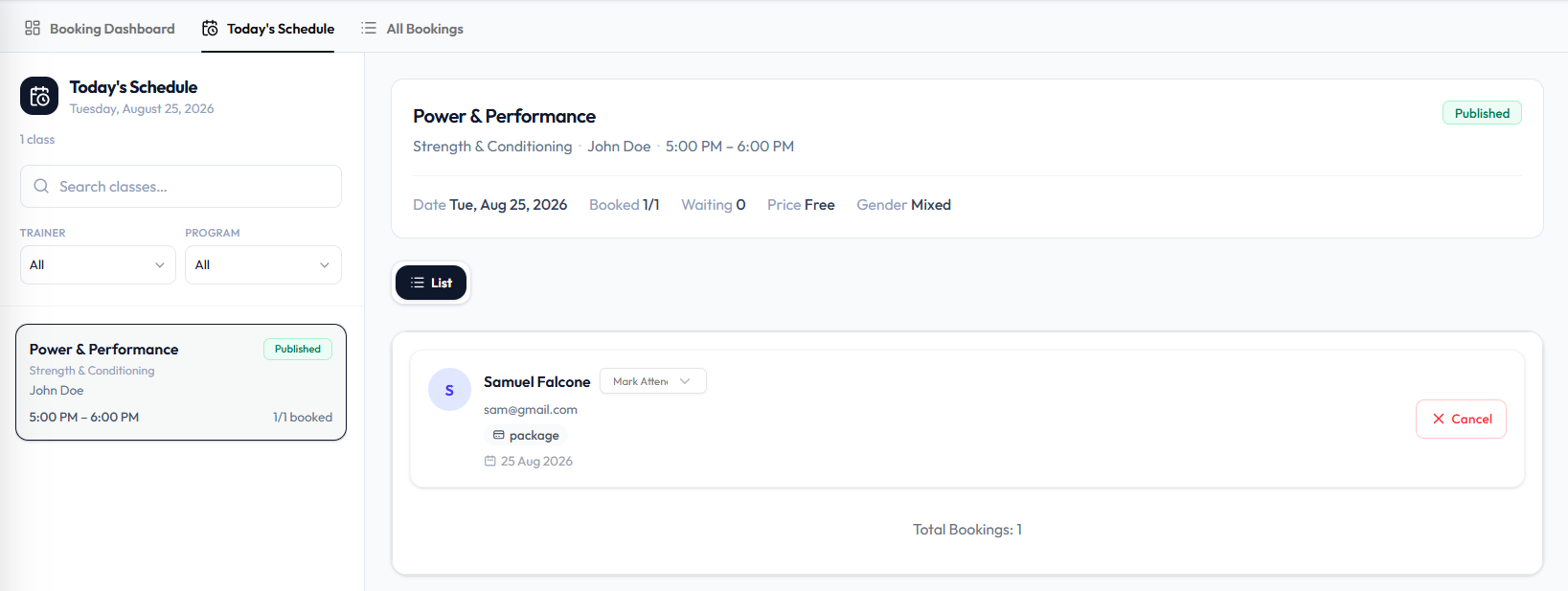
The panel can show:
- Class name, program, trainer, time
- Published (or other status on the card)
- Booked (for example 1/1), Waiting, Price, Gender
- Attendee cards with name, email, Mark Attendance, payment (package), date, and Cancel
- Total Bookings
This is also where you book a client into the class.
From Classes
Open Training → Classes, then open ⋯ and choose View & manage bookings.
The class header can show booked and waiting counts, trainer, date, time, booking type, and gender. For a past class, see Class Statuses.
On a draft class, the same View & manage bookings action is on the draft row menu. See Cancel or Delete a Class.
From All Bookings
Training → Booking → All Bookings → ⋯ → View details. There is no screenshot of that panel yet.
Seat labels (for example Seat C4) appear on some class detail captures. Today’s Schedule attendee cards in the current capture do not show seat numbers.