Package Restrictions
A package can be limited so it is not valid everywhere, for every class, or at every time. Choose that when you create a package, on Create Package Step 1 — Package Type.
The heading is SELECT A PACKAGE CATEGORY.
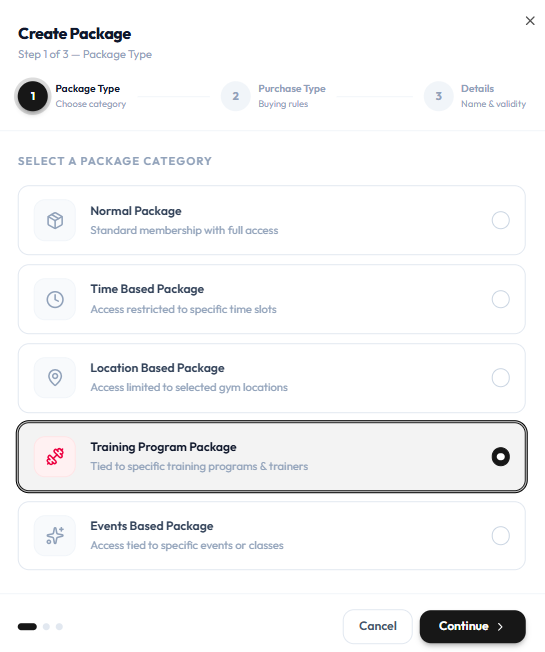
| Category | Helper text on the form |
|---|---|
| Normal Package | Standard membership with full access |
| Time Based Package | Access restricted to specific time slots |
| Location Based Package | Access limited to selected gym locations |
| Training Program Package | Tied to specific training programs & trainers |
| Events Based Package | Access tied to specific events or classes |
Training Programs on Details
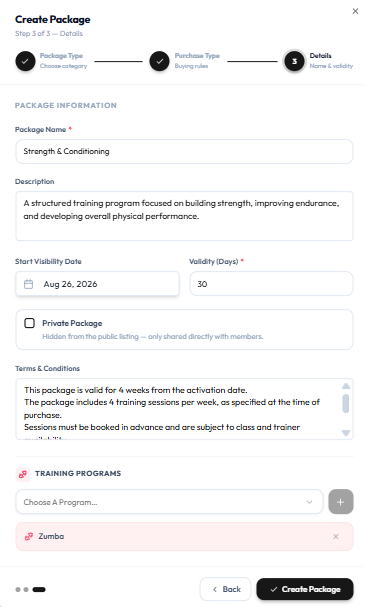
For a Training Program Package, Step 3 includes TRAINING PROGRAMS. Use Choose A Program… and + to attach programs (for example Zumba).
Normal Packages When Editing
On Edit Package, Feature Type can be Normal. The note is: Normal packages have no booking restrictions — members can book any location, program or event within the validity period.
Standard Access on Cards
Grid cards also show Standard Access. This guide does not redefine that label beyond what appears on the card.
Extra pickers for time slots, locations, trainers, or events after you choose a restricted category are only partly shown (training programs on Step 3). What a member sees if they try to book outside the restriction is not confirmed.