Create a Class
Add a class when you need one session — for example HIIT on Monday from 7:00 AM to 8:00 AM in London. Use a Schedule instead when the same session should repeat every week.
Before You Start
- Confirm you are in the correct Location.
- Know the Training Program, date, and start and end time.
- Know which Trainer will run the session.
Steps
Step 1 — Open Classes
Open Training → Classes. The page title is Class Management.
Step 2 — Click Create New Class
Click + Create New Class. The form title is Create New Class. The subtitle is: Fill in the details below to add a new class to your schedule.
A badge next to the title shows Published or Draft, matching the Status field.
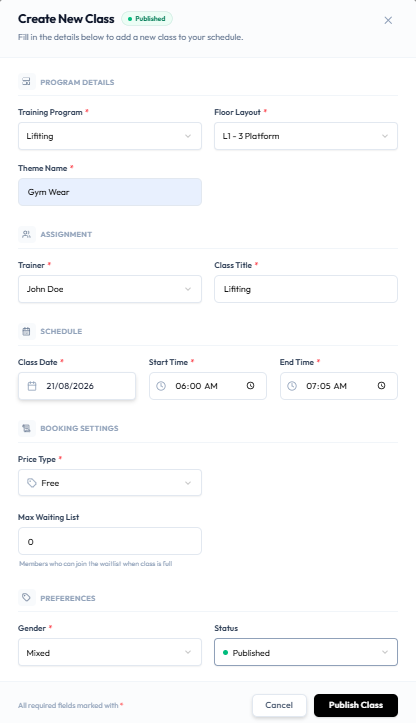
Step 3 — Enter the Session Details
Required fields are marked with an asterisk. The footer note is: All required fields marked with *.
PROGRAM DETAILS
| Field | What it is |
|---|---|
| Training Program | The program, such as Lifting |
| Floor Layout | The studio layout, such as L1 - 3 Platform |
| Theme Name | A name for the session theme, such as Studio Wear |
ASSIGNMENT
| Field | What it is |
|---|---|
| Trainer | Who teaches the class. See Assign Trainers |
| Class Title | The name shown on the list, such as Lifting |
SCHEDULE
| Field | What it is |
|---|---|
| Class Date | The session date |
| Start Time | When the class starts |
| End Time | When the class ends |
After you save, date and time cannot be changed. See Edit a Class.
BOOKING SETTINGS
| Field | What it is |
|---|---|
| Price Type | How members pay. See Class Payment Options |
| Max Waiting List | How many people can wait when the class is full |
The waitlist help text is: Members who can join the waitlist when class is full.
PREFERENCES
| Field | What it is |
|---|---|
| Gender | Mixed, Male, or Female. See Gender Restrictions |
| Status | Published or Draft. See Publish a Class |
If the trainer already has a class in that slot, Fitnez Studio shows: Trainer already has a class scheduled in this time slot. See Timetable Conflicts.
Step 4 — Save
- Cancel closes the form without saving.
- Publish Class saves a class with status Published.
- Save as Draft appears when Status is Draft.
After Saving
The class appears on Class Management with its date, time, trainer, capacity, waitlist cap, and status. Filter with Draft Classes if you saved a draft.