Challenge Details
A Booking Challenge rewards members for completing Bookings. It is not a Package Challenge.
On the Challenge step, Challenge Type Booking Challenge is described as: Reward participants for completing bookings.
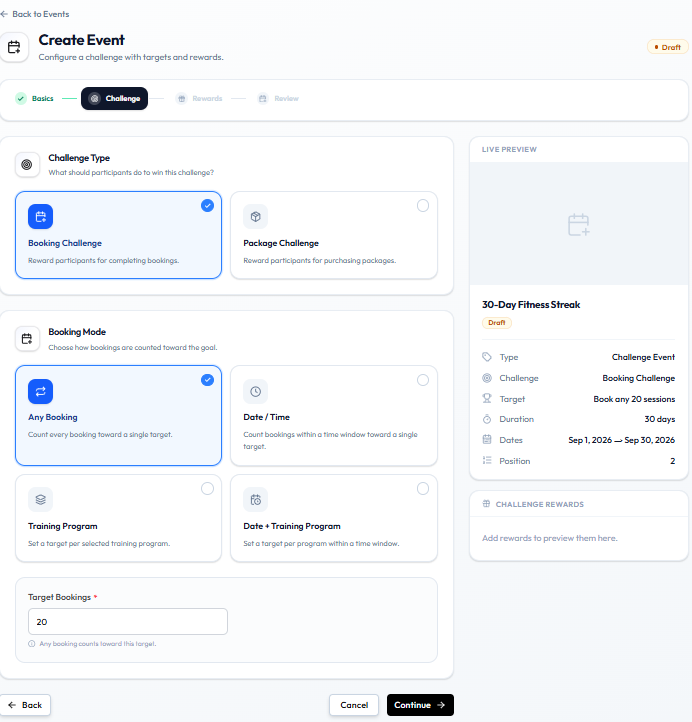
Booking Mode
When Booking Challenge is selected, Booking Mode has four cards:
| Booking Mode | Description on the card |
|---|---|
| Any Booking | Count every booking toward a single target. |
| Date / Time | Count bookings within a time window toward a single target. |
| Training Program | Set a target per selected training program. |
| Date + Training Program | Set a target per program within a time window. |
Any Booking is selected in this screenshot.
Target
Target Bookings is required. The example value is 20.
The help text for Any Booking is: Any booking counts toward this target.
LIVE PREVIEW shows Target: Book any 20 sessions.
The challenge dates still come from Basics (Start Date and End Date), such as 1–30 September.
Examples
Any Booking
Attend any 12 eligible classes during September.
On the form: Booking Challenge → Any Booking → Target Bookings 12 → Basics dates in September.
Emma Wilson in Dublin books any class. Each booking counts toward the one target.
Training Program
Complete 8 strength-training bookings during September.
Choose Training Program. The card says you set a target per selected Training Program. The program picker itself is not in this screenshot.
Date / Time
Complete 5 eligible bookings between 1 September and 15 September.
Choose Date / Time. Basics already has a start and end date. Extra time-window fields for this mode are not in this screenshot.
Related Articles
Package-Based Challenges
A Package Challenge rewards members for purchasing Packages. It is not a Booking Challenge.
On the Challenge step, Challenge Type Package Challenge is described as: Reward participants for purchasing packages.
Buying a package is a sales action. Booking a class is a different challenge type.
Package Challenge is visible as a type card. The fields after you select it (any package vs a specific package, target, extra dates) are not in the current screenshot. Screenshot to add: Challenge step with Package Challenge selected.
What a Package-Based Challenge Means
Members progress by purchasing an eligible package during the challenge window from Basics (Start Date–End Date). Rewards are attached on the Rewards step. Automatic awarding is not confirmed.
Examples
Set Challenge Type to Package Challenge, then complete whatever package fields Fitnez Studio shows.
Any Package
Purchase any eligible package during September.
Specific Package
Purchase the 10-Class Strength Package before 30 September.
Example campaign:
Package Starter Challenge — Purchase the 10-Class Strength Package before September 30 and receive 100 QAR wallet credit.
Create that credit first on Creating a Wallet-Credit Reward, then Attach It.
Whether refunds, failed payments, or Approval Requests still count is not shown. See Sales & Payments.
Challenge Conditions & Targets
This is the rule set behind a Challenge Event: what members must do, what counts, how much they need, and by when.
Challenge = Activity + Condition + Target + Time Window + Reward
Workflow — Configure Challenge Target
Activity → Condition → Target → Deadline → Reward
On Create Event that maps to:
- Challenge Type (activity)
- Booking Mode (condition), when the type is Booking Challenge
- Target Bookings (target)
- Start Date and End Date on Basics (time window)
- Rewards step (reward)
What the Member Must Do
| Challenge Type | Description on the card |
|---|---|
| Booking Challenge | Reward participants for completing bookings. |
| Package Challenge | Reward participants for purchasing packages. |
Do not add other activities (referrals, spend totals) unless they appear on this step.
What Counts (Booking Challenge)
| Booking Mode | What the card says |
|---|---|
| Any Booking | Count every booking toward a single target. |
| Date / Time | Count bookings within a time window toward a single target. |
| Training Program | Set a target per selected training program. |
| Date + Training Program | Set a target per program within a time window. |
For Any Booking, the help text is: Any booking counts toward this target.
Package Challenge conditions after you select that type are not captured.
Target
Target Bookings is the number, such as 20. Live Preview shows Book any 20 sessions.
When progress is complete, and whether a booking or a Check-In counts, is not labelled here.
Deadline
| Field | Where it is |
|---|---|
| Start Date | Basics, under Challenge Duration |
| End Date | Basics |
| Duration | Auto badge, such as Duration: 30 days |
What happens after the end date — whether progress stops, whether members can still join — is not confirmed.
Challenge Type vs Booking Mode
| Term | Meaning on the form |
|---|---|
| Event Type | Normal Event or Challenge Event |
| Challenge Type | Booking Challenge or Package Challenge — what is measured |
| Booking Mode | How bookings are counted (any, date/time, program, or both) |
Do not treat Challenge Type and Booking Mode as the same field.
Example
30-Day Fitness Streak for Emma Wilson in Dublin:
Complete at least 20 eligible workout sessions within 30 days.
| Part | Value on screen |
|---|---|
| Activity | Booking Challenge |
| Condition | Any Booking |
| Target | 20 |
| Time window | 1–30 September 2026 |
| Reward | Added on the Rewards step |
Daniel Murphy keeps Status as Draft until Sophie Bennett is ready to set it Active.
Extra fields for Date / Time, Training Program, Date + Training Program, and Package Challenge are not in the current screenshot.