Member Wallet
The member wallet is a store of money on the member’s record. Staff can Credit or Debit that balance in Manage Wallet Balance.
It is not a class pack. Sessions on a Package are usage entitlements. Wallet money is a monetary balance.
Wallet Balance Versus Package Credits
| Wallet Balance | Package Credits |
|---|---|
| Monetary balance | Usage entitlement |
| Credited or debited in Manage Wallet Balance | Used for classes / package benefits |
| Can appear as Source → Wallet on Transactions | Shown on held packages |
Manage Wallet Balance
The dialog title is Manage Wallet Balance. Subtitle: Select transaction type and enter amount.
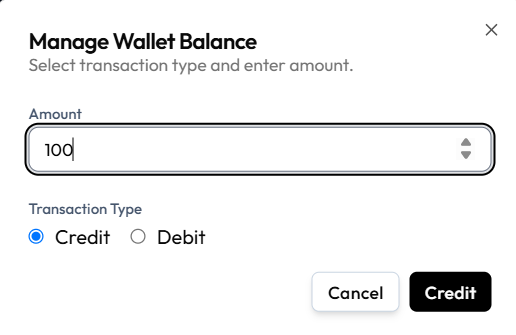
| Control | On the capture |
|---|---|
| Amount | Number field (for example 100) |
| Transaction Type | Credit or Debit |
| Cancel | Close without saving |
| Primary button | Credit or Debit (matches the selected type) |
A reason / note field is not on this screenshot.
Where Wallet Appears on Transactions
On Finance → Transactions, the Source filter includes Wallet. The Gateway filter also includes Wallet.
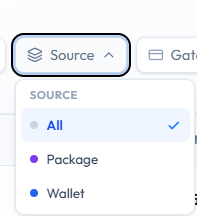
Studio-wide money in and out stays under Finance → Transactions. See The Sales Ledger.
Where to Open It
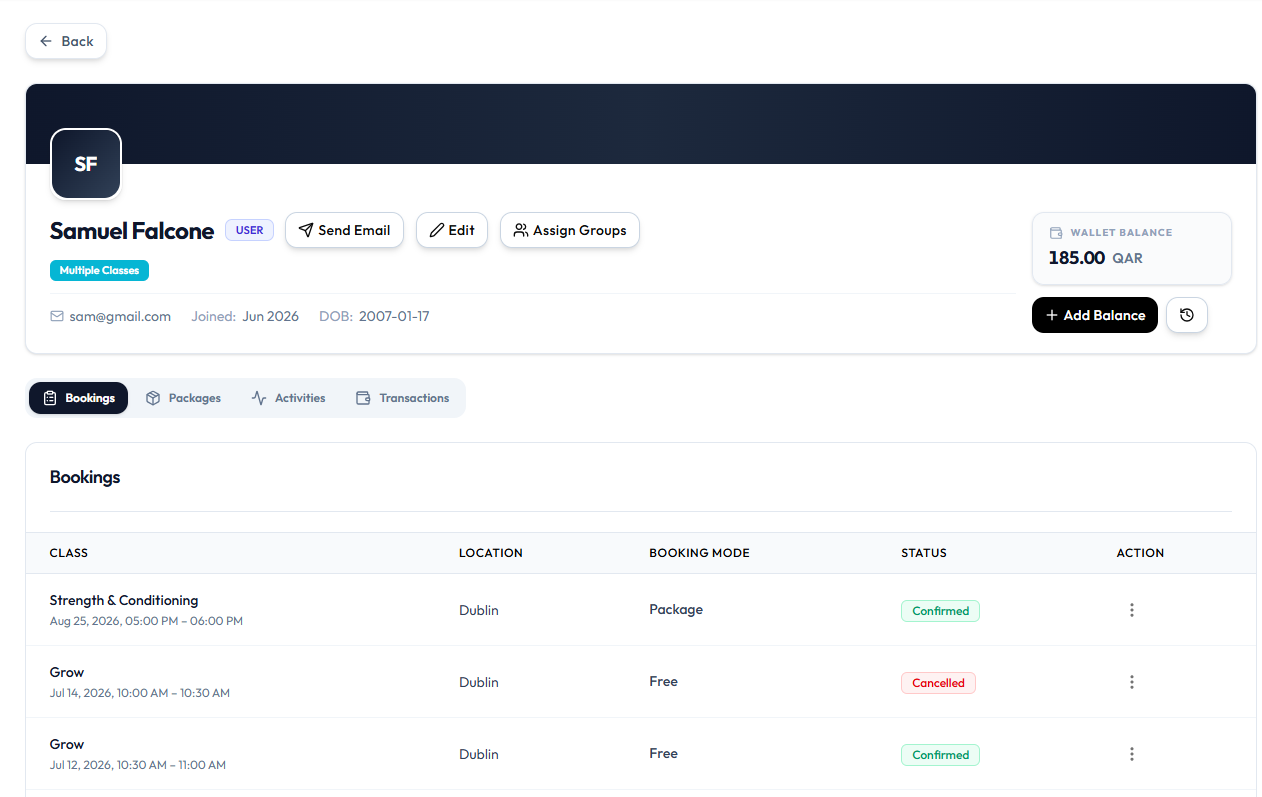
On the Full Client Page, the header shows WALLET BALANCE (for example 185.00 QAR) and + Add Balance. That button opens Manage Wallet Balance.
Frequently Asked Questions
Is wallet the same as remaining sessions?
No. Wallet is money. Sessions are package usage.
Where do I see studio sales?
Finance → Transactions.
Adding Money to a Member’s Wallet
Add money with Transaction Type → Credit in Manage Wallet Balance.
This changes wallet balance (money). It does not add Package Sessions.
When Staff Might Credit
- The member pays a top-up
- A manager approved a goodwill or refund adjustment
- You are correcting a previous mistake
Workflow — Credit Wallet
Step 1 — Open the Member
Open People → Clients, find the client, and open the Full Client Page.
Step 2 — Click Add Balance
On the header, next to WALLET BALANCE, click + Add Balance.
Step 3 — Open Manage Wallet Balance
The window title is Manage Wallet Balance. Subtitle: Select transaction type and enter amount.
Step 4 — Enter Amount
Type the amount (for example 100).
Step 5 — Select Credit
Under Transaction Type, choose Credit.
Step 6 — Confirm
Click the primary Credit button, or Cancel to close without saving.
What Happens Next?
The wallet balance should increase. A related row may appear under Finance → Transactions when Source is Wallet — confirm with filters if needed. See The Sales Ledger.
If your role cannot credit the wallet, Request the Change.
Deducting Money from a Member’s Wallet
Deduct money with Transaction Type → Debit in Manage Wallet Balance.
This is not the same as Removing a Package or Adjusting Sessions.
Workflow — Debit Wallet
Step 1 — Open the Member
Open People → Clients, find the client, and open the Full Client Page.
Step 2 — Click Add Balance
Click + Add Balance next to WALLET BALANCE. The same dialog is used for debit.
Step 3 — Open Manage Wallet Balance
Step 4 — Enter Amount
Type how much to deduct.
Step 5 — Select Debit
Under Transaction Type, choose Debit. The primary button should show Debit.
Step 6 — Confirm
Click Debit, or Cancel to close without saving.
Whether Fitnez Studio allows a balance below zero is not shown on this capture. Do not deduct more than the available balance unless the product clearly allows it.
What Happens Next?
The wallet balance should decrease. Check Finance → Transactions with Source → Wallet if you need the studio ledger row.
If you cannot debit directly, Request the Change.
Viewing a Member’s Wallet History
Wallet history is the list of credits and debits for one member’s wallet. Use it when a client queries a balance, or when a manager reviews what staff changed.
On the studio ledger, wallet-related rows can be found with Finance → Transactions → Source → Wallet.
Credit and Debit on Screen
Manage Wallet Balance records a change with Amount and Transaction Type (Credit or Debit).
A separate history table (columns such as reason or balance after) is not in the current screenshots.
Until a dedicated wallet history screen is captured, use Source → Wallet on Transactions and the Credit/Debit dialog as the confirmed wallet money trail.
Workflow — Review Wallet Activity
Step 1 — Open Transactions (Studio-Wide)
Finance → Transactions → Source → Wallet. Optionally filter by date or search the client name.
Step 2 — Or Open the Member
People → Clients → open the member → open wallet if Fitnez Studio shows a history list there.
Step 3 — Match Amounts
Compare AMOUNT, STATUS, and DATE to what the client expects. Use ⋯ → Copy txn ref if you need the full reference.
Requesting a Wallet Change
If your Role cannot change a wallet directly, you request the change. A manager or admin then approves or rejects it. The wallet should update only after the application’s approval workflow allows it.
This is the same idea as other limited-role work: raise a request instead of making the change yourself. See Approval Requests.
Direct Change Versus Approval Request
| Approach | When to use it |
|---|---|
| Direct Credit or Debit | Your role can change the wallet |
| Request | You cannot see or use those actions |
Permissions exist so not every staff member can move money on a member’s wallet. A reason is required so the approver (for example Sophie Bennett) knows why Daniel Murphy asked for the change.
There is no screenshot of a wallet change request form. Button labels such as Request or Submit are not confirmed. Approval Requests shows Wallet Credits cards after a credit is requested, with a reason, Requested by, date, and amount such as 100 · Cash.
Workflow — Request Wallet Change
Step 1 — Open the Member
Open People → Clients and View Profile.
Step 2 — Open Wallet
Open wallet management.
Step 3 — Start a Wallet Change Request
Use Request, Raise request, or the equivalent action if it is shown. If wallet has no request action, open Approvals → Permission Requests and follow how your studio raises other requests.
Step 4 — Select Credit or Debit
Choose add money or deduct money.
Step 5 — Enter the Amount
Enter the amount.
Step 6 — Enter a Reason
Explain the change clearly.
Step 7 — Submit the Request
Submit so it appears for review.
Step 8 — Manager or Admin Reviews
The reviewer opens Approval Requests.
Step 9 — Approved or Rejected
The reviewer accepts or declines the request using the actions Fitnez Studio shows.
Step 10 — Wallet Updates Only If Approved
The balance should change only according to that workflow — not when the request is still pending, and not if it is rejected.
If the Request Is Rejected
- Read any note the reviewer left, if Fitnez Studio shows one
- Do not change the wallet another way to bypass the decision
- Correct the amount or reason and submit again if that is still needed
- Ask the manager what they need before you retry
What Happens Next?
While the request is waiting, treat the wallet as unchanged. After approval, confirm the new balance and a row in Wallet History.