Studio Layouts
A layout is the floor plan of spots or stations members book into — bikes, mats, reformers, or other positions. It is not the training program, and it is not a Location.
What Is a Studio Layout?
A layout represents how bookable positions are arranged in a room.
Examples that match this idea:
- Cycling bikes
- Reformer Pilates stations
- Yoga mats
- HIIT stations
A spot is one bookable position in that layout.
Layout Required on a Program
On Add new program or Edit Program, turn on Layout Required when that program needs a floor plan.
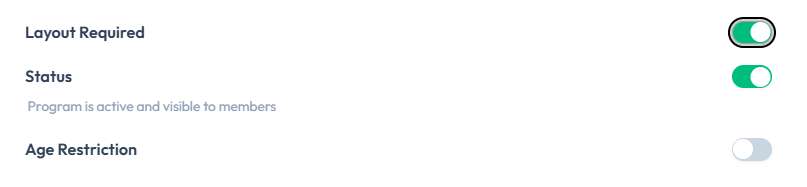
When Layout Required is on, the program card on Training Programs shows a Layout tag.
These captures show the Layout Required toggle and the Layout tag on program cards. There is no screenshot yet of a separate layout list or floor-plan editor. Steps that design spots still need confirmation in Fitnez Studio.
Why Studio Layouts Are Used
A layout lets staff match the dashboard to the physical room. When Spot Reservation is on, members can pick a specific spot when they book.
Do not assume every class uses a layout, or that every class lets members choose a spot. That depends on Layout Required, the class, and settings.
Layout Versus Program Versus Class
| Term | What it defines |
|---|---|
| Training program | The type of training, such as Cycling |
| Layout Required | Program setting that marks the program as needing a layout (Layout tag on the card) |
| Layout | The physical bookable positions |
| Class | One session at a date and time, which can use a program and, where supported, a layout |
Spot Settings on the Program
On create and edit program, SPOT SETTINGS includes Spot Name and Spot Left Label. Those labels are on the program form; how they appear on a floor plan is not in the current screenshots.
Multiple Floor Layouts
You need more than one layout when the physical arrangement is different, for example:
- Different rooms
- Different equipment
- Different capacities
- Different class types
Settings may include Enable multiple floor layouts. Whether one program can have several layouts at the same time is not confirmed from the program screenshots.
Frequently Asked Questions
What does the Layout tag on a program card mean?
Layout Required is on for that program. See Create a Training Program.
Can members choose their own spot?
Only if Spot Reservation is on, and the class uses a layout. That member experience is not confirmed from a screenshot yet.
Is a layout the same as a location?
No. A location is the site. A layout is the floor plan inside a space. See Location Concepts.
Create a Layout
Create a layout when a program needs a floor plan of bookable spots — for example bikes for Cycling in Dublin.
Before You Start
- The Training Program should already exist.
- Know which room or arrangement this layout is for.
- Confirm you are in the correct Location.
Turn on Layout Required First
On Add new program or Edit Program, set Layout Required to on. The program card then shows a Layout tag.
You can also set Spot Name and Spot Left Label under SPOT SETTINGS on that form. See Create a Training Program and Edit a Training Program.
Step 1 — Open the Program
Open Training → Training Programs, then open the program with the pencil control.
Step 2 — Confirm Layout Required
Under SETTINGS, turn Layout Required on, then Update Program.
Step 3 — Create the Floor Plan
Use the create-layout action when it is visible for that program.
Step 4 — Enter Layout Details
Complete the fields Fitnez Studio shows. The topic plan includes layout name and the program it is for.
There is no screenshot of a separate create-layout form or floor-plan editor yet. This guide does not invent button labels or spot-placement controls beyond Layout Required and spot labels on the program form.
Step 5 — Save and Continue to Design
Save, then Place Spots on the Floor Plan when that screen is available.
After Saving
A new layout should be available to design, preview, and later Attach to a Class. Whether it is usable by members before you Publish it is not confirmed.
Design a Layout
Design the layout so the floor plan matches the physical room. Staff use it to organise spots. Members use it to pick a position when Spot Reservation is on.
The Visual Floor Plan
The layout is a picture of the room: where each bike, mat, reformer, or station sits. Arrange it the way people walk into the space, so a member looking at Spot 4 is looking at the same place in the studio.
Do not treat the editor as a technical drawing. It is a booking map.
Maximum Spots
The help topic plan includes: Set how many spots a room can hold.
Maximum spots is the bookable capacity of that layout — how many positions the room should accept.
This guide does not assume that maximum spots equals the number of items you placed on the floor plan. Those two numbers may be linked, or they may be set separately. Confirm on the layout screen before you rely on either figure for class capacity.
On Training → Classes, each class already shows a CAPACITY value, such as 0/4. Whether that number comes from the layout, from the class, or from a default in Settings is not confirmed here.
Step 1 — Open the Layout
Open the layout you Created.
Step 2 — Place Spots and Stations
Add the bookable positions. The topic plan describes placing spots and stations.
Controls such as add, move, rename, delete, or duplicate a spot will be listed here when the editor screenshot is available. Do not assume those buttons exist until they are visible.
Step 3 — Set Maximum Spots
Enter the maximum number of spots the room can hold, using the field Fitnez Studio shows.
Step 4 — Save
Save the floor plan.
There is no screenshot of the layout editor. This page does not list editor tools or the exact capacity field name.
After Saving
Check Desktop and Mobile Preview so the plan is readable on both. Then Publish if the product requires that step before classes can use the layout.
If this layout is already attached to classes, see Update a Layout before you change spots.
Spot Reservation
Spot reservation is the switch that lets a member choose a specific spot — a bike, mat, or station — when they book.
The help topic plan and the Settings outline include this as a setting: Let members reserve a specific spot.
On the training program form, Layout Required marks that the program needs a floor plan. That is separate from the member spot-reservation setting.
There is no screenshot of the member booking screen or of the Settings spot-reservation control itself. Confirm the exact member experience in Fitnez Studio before you train front desk on it.
When Spot Reservation Is Off
Members book the class, not a numbered position. Staff may still see a layout for the room, but the member does not choose a spot at booking time.
What staff can change later on the class roster is covered in Choose & Change Spots.
When Spot Reservation Is On
Members should be able to pick an available spot on the layout when they book.
Until the booking screen is captured, this guide does not confirm:
- Whether they choose the spot during booking or after
- Whether taken spots are hidden or shown as unavailable
- Whether the selected spot is stored on the booking
- What the member sees if every spot is taken (for example the Waiting List)
How This Connects to Layouts
Spot reservation only helps if the class uses a Layout with spots to choose from. A class with capacity but no layout is not enough to assume members can pick a position.
Settings may also include Enable multiple floor layouts. That is a separate switch from spot reservation.
Desktop & Mobile Preview
Preview the layout on desktop and on mobile so members can read the floor plan on both. A plan that works on a large screen can be hard to tap on a phone.
Why Both Views Matter
Members book from different devices. If a spot label overlaps or sits off-screen on mobile, they cannot choose it reliably — even when Spot Reservation is on.
Step 1 — Open the Layout
Open the layout you want to check.
Step 2 — Preview Desktop
Use the desktop preview control if Fitnez Studio shows one.
Step 3 — Preview Mobile
Switch to the mobile preview. Look at spot labels, spacing, and whether every spot is still reachable.
Step 4 — Adjust and Save
If the mobile view is unclear, Change the Design and preview again.
There is no screenshot of desktop or mobile preview. This guide does not describe separate preview buttons, a responsive preview only, scaling, or automatic rearrangement on small screens.
What Members See
Staff preview is meant to match what members see when they pick a spot. Until a member-facing screenshot exists, this page does not describe the public website or mobile app layout.
Duplicate a Layout
Duplicate a layout when two rooms are almost the same and you do not want to rebuild the floor plan. For example, two Cycling rooms in Amsterdam with the same bike count.
Why Duplicate
- Same arrangement, different room name
- A starting point you can tweak instead of placing every spot again
Duplication should copy the layout you can see. This guide does not claim it copies unpublished drafts, class attachments, or settings that are not on the layout screen.
Step 1 — Find the Existing Layout
Open the program or layout list and select the layout to copy.
Step 2 — Choose Duplicate
Use Duplicate if that action is on the screen.
Step 3 — Update the New Layout
Give it a name that staff will recognise, such as the other room. Change spots if the rooms are not identical.
Step 4 — Save
There is no screenshot of Duplicate. This guide does not list what is copied — name, spots, maximum spots, or other settings.
Publish or Retire a Layout
Publish a layout when it is ready for classes. Retire a layout when that floor plan should no longer be used.
There is no screenshot of Publish or Retire. This guide does not say what happens to classes that already use the layout. Confirm that result before you retire a layout that is in use.
What Publishing Means
The topic plan treats publish as the step that makes the layout available to attach to a class or to show to members.
Until the screen is confirmed, this page does not list extra effects — for example whether members can see spots immediately.
How to Publish
Step 1 — Finish the Layout
Step 2 — Publish
Use Publish if Fitnez Studio shows that action.
What Retiring Means
Retire when the room has changed, or the layout should not be chosen for new classes.
How to Retire
Step 1 — Find the Layout
Open the layout that should no longer be used.
Step 2 — Retire
Use Retire if that action is on the screen. Read any confirmation.
Classes That Already Use the Layout
This is the important rule, and it is not confirmed:
- New classes may be blocked from choosing a retired layout
- Existing classes may keep the old layout, switch, or lose spots
Do not retire a live layout until you know which of those happens.
Update a Layout
Update a layout when the physical room has changed — more bikes, a different grid, or renamed spots.
This is a business-critical change. Classes that already use the layout may be affected.
What happens to existing classes after you save a layout change is not confirmed. This guide does not say that bookings keep their spots, move, or are cancelled. Confirm in Fitnez Studio before you edit a layout that is already attached to classes.
Step 1 — Open the Layout
Find the layout from the program or layout list.
Step 2 — Make the Changes
Update name, Spots, or maximum spots as the editor allows.
Step 3 — Preview
Check Desktop and Mobile.
Step 4 — Save
Save. Note when the change takes effect — immediately or only on future classes — if Fitnez Studio tells you.
What Can Be Changed
The topic plan includes updating the layout. Without the editor screenshot, this page does not list every editable control.
If you only need the same plan in another room, Duplicate instead of editing the original.
Attach a Layout to a Class
Attach a layout when a class should use a specific floor plan. Members then see those spots if Spot Reservation is on.
How Program, Layout, and Class Fit Together
The topic plan describes this chain:
- A training program defines the type of training.
- A layout defines the bookable positions.
- A class is one session that uses the program and, where supported, a layout.
On the program form, turn on Layout Required when the program needs a layout. Whether you also pick a specific layout on the class form is not confirmed yet.
Step 1 — Open the Class
Open Training → Classes, then open the class — for example Cycling on a Monday evening.
Class Management is where sessions are listed. See Classes for how class names relate to programs.
Step 2 — Choose the Layout
Find the layout setting on the class. Select the layout that matches the room.
Step 3 — Save
Save the class.
There is no screenshot of a layout field on Create Class or Edit Class. This guide does not name the setting or say whether a class can run without a layout.
After Saving
The class should use that floor plan for bookings and for the class roster. Capacity on the Classes list (for example 0/4) may or may not come from the layout. Do not assume they are the same number until that is confirmed.