Sales & Payments
Staff review payments under Finance → Transactions. That list is the studio ledger for packages and wallet money. Totals and charts are on Finance → Sales Analytics — see Reports & Analytics.
What Is a Transaction?
A transaction is one payment record — who paid, what they bought, how much, how they paid, and whether it succeeded.
It is not a Class and not a Booking. A Package is what was sold. The transaction is the money record for that sale (or a Wallet change).
Where to Find It
| Place | What it is for |
|---|---|
| Finance → Transactions | Ledger with filters, search, and invoice actions |
| Finance → Sales Analytics | Revenue charts and rankings |
| Dashboard | Today’s Revenue for the selected day |
| People → Clients | Member profile; wallet manage may open from there |
| Training → Packages | What you sell |
Confirm you are in the correct Location (for example Dublin).
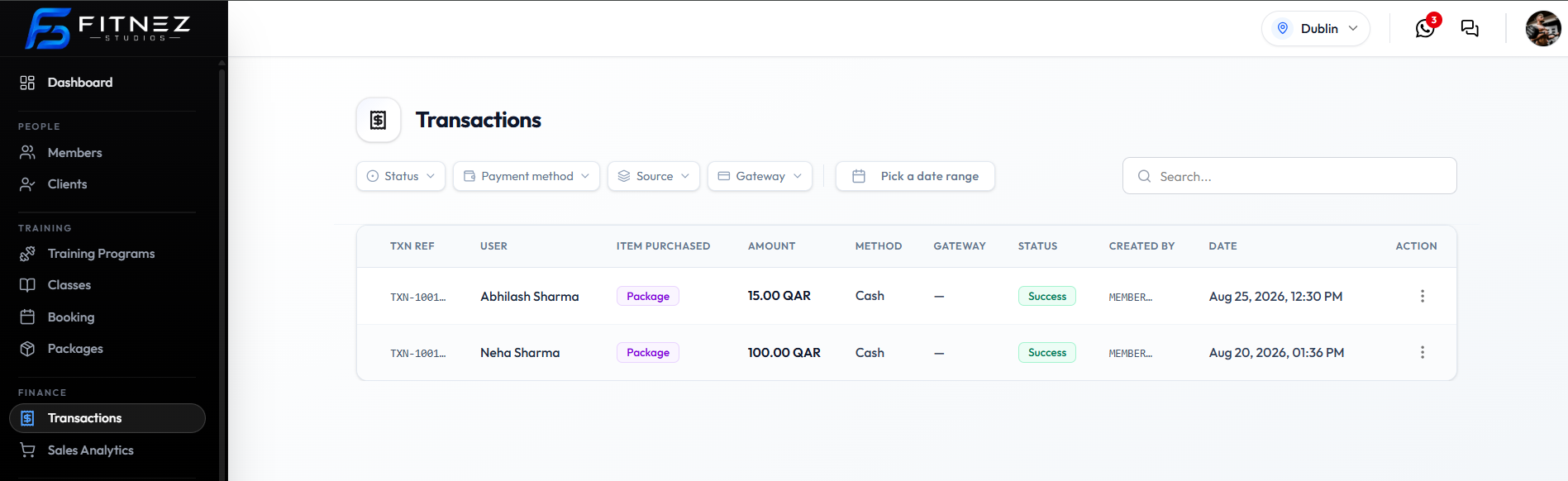
What You See on Transactions
Filters above the table:
- Status
- Payment method
- Source
- Gateway
- Pick a date range
- Search…
| Column | Examples on the capture |
|---|---|
| TXN REF | Truncated id such as TXN-1001... |
| USER | Client name |
| ITEM PURCHASED | Purple pill — for example Package |
| AMOUNT | 15.00 QAR, 100.00 QAR |
| METHOD | For example Cash |
| GATEWAY | Provider name, or — for cash |
| STATUS | For example Success |
| CREATED BY | Who created the record |
| DATE | Date and time |
| ACTION | ⋯ menu |
Row menu actions on the capture:
- Copy txn ref
- Download invoice
- Send invoice

Status, Method, Source, Gateway
| Filter | Options on screen |
|---|---|
| Status | All, Pending, Failed, Success, Cancelled |
| Payment method | All, Cash, Gateway |
| Source | All, Package, Wallet |
| Gateway | All, Stripe, Wallet |
See Transaction Statuses and The Sales Ledger.
What You Can Do
- Find a Transaction
- Filter by Status
- Copy Txn Ref / Open Actions
- Download or Send an Invoice
- Record a Cash Package Sale
- Credit or Debit a Wallet
- Connect a Payment Gateway
- Handle Failed Payments
How Sales Connect to Other Areas
| Area | How it connects |
|---|---|
| Packages | Catalogue of what you sell — often ITEM PURCHASED: Package |
| Clients | USER on each row |
| Wallet | Source can be Wallet; manage balance with Credit / Debit |
| Invoices | Download invoice and Send invoice on the row menu |
| Website Tax & Invoice | Invoice prefix and footer defaults |
Frequently Asked Questions
Where is Sales in the menu?
Finance → Transactions. There is no sidebar item labelled Sales.
Is wallet the same as remaining sessions?
No. The Wallet is money. Sessions are Package Credits.