Refunds, Failed Payments & Invoice Settings
Use this page when a payment did not work, or when you need to investigate money that should go back to the client.
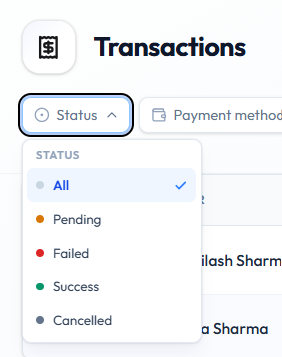
Open Finance → Transactions, then filter Status.
Failed Payments
Failed means the attempt did not collect the money. Do not treat the client as having paid.
Check these first:
- Open Finance → Transactions.
- Set Status → Failed (or find the row and read STATUS).
- Confirm USER, AMOUNT, METHOD, and GATEWAY.
- If METHOD was Gateway, check the Payment Gateway.
- If it should have been cash, see Recording a Cash Sale.
Ask the client to pay again, or record Cash only if you have the money. Wait for a new row with Success before treating a Package as sold.
Do not mark a failed payment as successful by hand. There is no “mark as paid” action on the Transactions row menu — confirmed actions are Copy txn ref, Download invoice, and Send invoice.
Pending Payments
Pending means the attempt is not finished. Wait, refresh, and do not treat the package as paid until STATUS is Success.
Cancelled
Cancelled means the attempt was cancelled. Confirm nothing is owed and the client does not have unpaid access.
Refunds
A refund returns money for a sale that was already Success.
A Refunded status and a Refund button are not on the current Transactions screenshots. Status filter options are All, Pending, Failed, Success, and Cancelled only. Do not invent a refund control until it appears in the product.
If your studio refunds outside this list (for example a Wallet Credit), record it clearly and check:
- The original transaction (Copy txn ref)
- Packages the Member Holds
- Wallet balance if you credited money back
Related Articles
- Transaction Statuses
- The Sales Ledger
- Member Wallet
- Connecting a Payment Gateway
- Downloading an Invoice
Customising Invoice Numbering & Footer
Invoice settings control how invoices are numbered and what note prints at the bottom. Stage 4 of the Setup Checklist includes customising your invoices.
Why It Matters
A clear prefix helps accounts recognise FITNEZ STUDIO invoices — for example:
FIT-INV-000123
That is an example only. Do not treat FIT-INV- as a confirmed field value.
What You Can Customise (Topic Plan)
| Setting | Intended use |
|---|---|
| Invoice numbering | The sequence of invoice numbers |
| Invoice prefix | Text at the start of the number, so invoices look like your brand |
| Footer / note | A line printed on the invoice — for example a thank-you or company note |
Exact field names are not confirmed. The Studio group in the sidebar is only partly visible on the dashboard screenshot, so this guide does not name a menu item such as Invoice settings as an on-screen label.
There is no screenshot of invoice settings. This page does not describe the form, defaults, or who can edit them beyond the setup checklist note that some tasks need an owner or admin. Screenshot to add: invoice prefix and footer fields.
Why Businesses Change the Prefix
- To match company stationery
- To tell studio invoices apart from other documents
- To include a short brand code, such as FIT
Workflow — Configure Invoice Settings
Step 1 — Open Invoice Settings
From the Getting Started tab, open the invoice customisation step if it is listed. Otherwise look under Studio or Settings for invoice options Fitnez Studio shows.
Step 2 — Set the Prefix
Enter a prefix if the field is there — for example FIT-INV-.
Step 3 — Add a Footer Note
Enter the note that should print on invoices.
Step 4 — Save
Save using the action Fitnez Studio shows.
What Happens Next?
The topic plan: newly generated invoices use the updated prefix and footer.
Whether old invoices stay as they were, and whether a downloaded copy is regenerated, is not confirmed. Download a new sale after you save if you need to check the look. See Downloading an Invoice.
Permissions
The setup checklist says some tasks can only be completed by an owner or admin. If you cannot see invoice settings, ask someone with a higher Role — for example Sophie Bennett.