Troubleshooting — Payments & Invoices
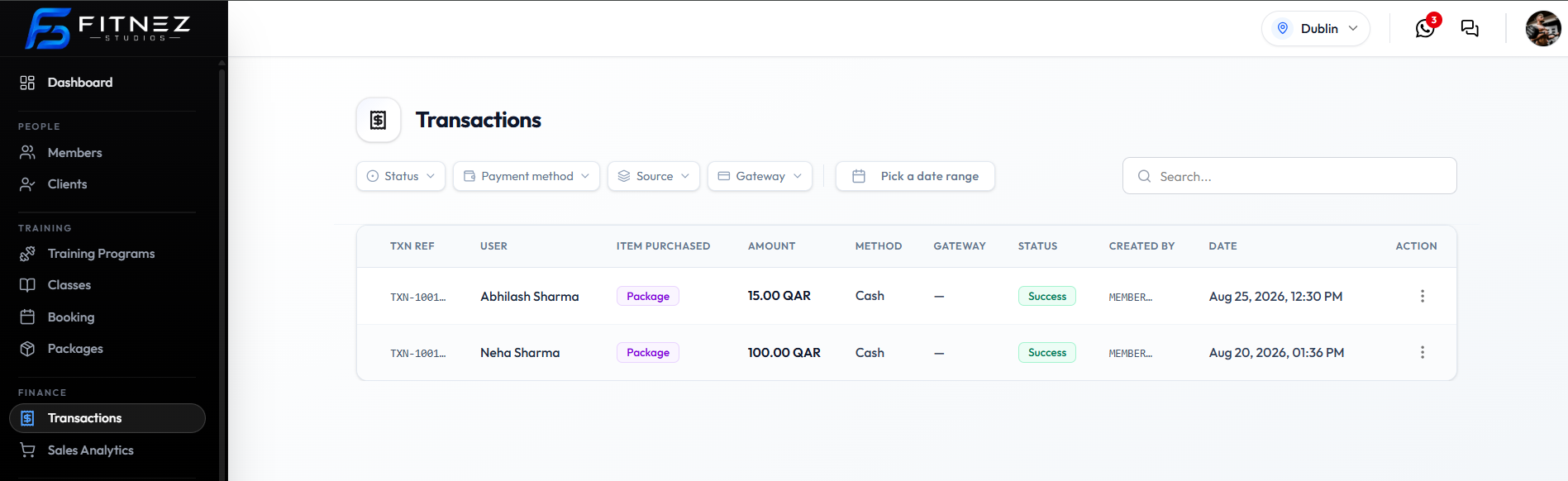
Find money under Finance → Transactions. Totals and charts are Finance → Sales Analytics — not the same list.
Why Did a Payment Fail?
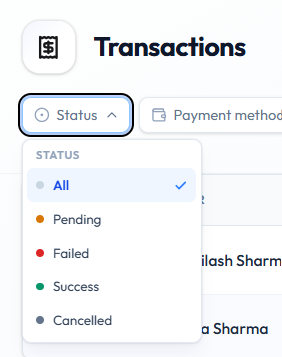
Set Status → Failed. A failed attempt did not collect the money.
Check these first:
- USER, AMOUNT, DATE
- METHOD — Cash or Gateway
- GATEWAY — for example Stripe or Wallet, or —
- ⋯ → Copy txn ref for the full reference
See Refunds & Failed Payments.
Why Is a Payment Pending?
Set Status → Pending. Wait, refresh, and do not treat the Package as sold until STATUS is Success.
Why Can’t I Find a Transaction?
- Open Finance → Transactions.
- Clear or widen filters (Status → All, clear date range).
- Try Search… with the client name.
- Try Source → Package or Source → Wallet.
- Confirm the header Location.
See The Sales Ledger.
Why Does an Invoice Look Incorrect?
- Find the row — match USER, AMOUNT, STATUS.
- ⋯ → Download invoice and compare the file.
- Check prefix/footer defaults on Website Tax & Invoice.
How Do I Correct a Mistake?
| Situation | What to do |
|---|---|
| Failed payment | Ask the client to pay again, or record Cash only if you have the money |
| Need invoice again | ⋯ → Download invoice or Send invoice |
| Wallet amount wrong | Credit or Debit in Manage Wallet Balance, or Request approval |
| Unsure who changed a package or wallet | Recent Activity |
There is no Refund action on the current Transactions row menu. Confirmed actions are Copy txn ref, Download invoice, and Send invoice.
Related Articles
Last updated on