Duplicate a Class
Duplicate a class when you need another session like one you already have — for example a second Cycling class on the same day at a different time.
Duplication is for a single extra class. For a repeating week, use a Schedule.
Steps
Step 1 — Find the Class
Open Training → Classes and select the class to copy. For a draft, open Draft Classes.
Step 2 — Choose Duplicate
Open the row menu (⋯) and choose Duplicate.
On Draft Classes, the menu includes Duplicate with the other draft actions:
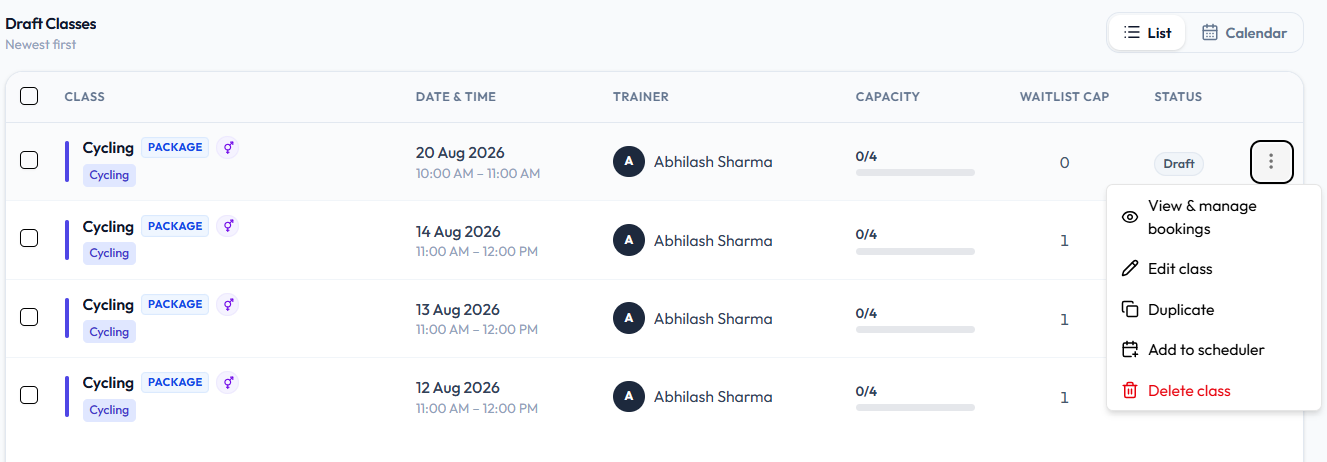
Duplicate is also on Upcoming classes. See the Classes Overview.
Step 3 — Adjust the Copy
Change the date or time so it does not clash with the original. If the trainer already has a class in that slot, Fitnez Studio shows: Trainer already has a class scheduled in this time slot. See Timetable Conflicts.
Step 4 — Save
Save the new class with Publish Class or Save as Draft.
There is no screenshot of the form after you choose Duplicate. This guide does not list which fields are copied automatically.