Client Groups
Client groups help you organise members — for example beginners, personal-training members, or a corporate account. Each group has a name and a colour so staff can recognise it quickly.
A group is not a staff role. Roles belong to Team Members.
What Is a Client Group?
A client group is a label you put on members so they are easier to find and recognise.
Examples of how a studio might name groups:
- Beginners
- Personal-training clients
- Corporate account
Those are examples only. They are not a built-in list in Fitnez Studio. The Manage Groups screenshot shows a group named Cycling.
Where to Find Groups
On People → Clients, click Manage group.
The page title is Manage Groups. The description is: Create and manage client groups with color coding for better organization.
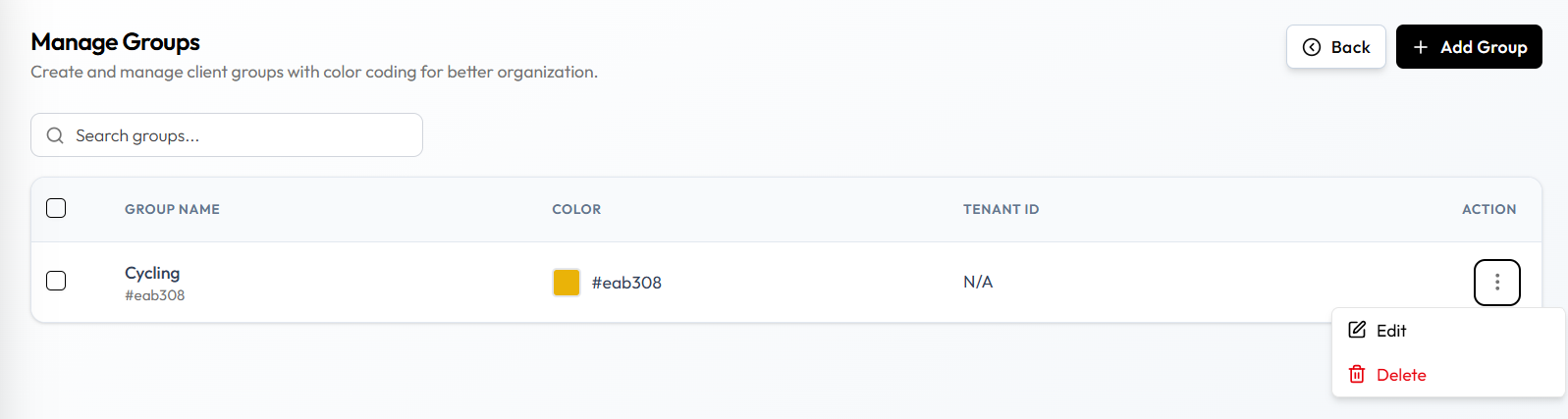
| Item | What it is |
|---|---|
| Back | Returns from Manage Groups |
| + Add Group | Opens the form to Create a Group |
| Search groups… | Finds a group by name |
| GROUP NAME | The group name, such as Cycling |
| COLOR | Colour swatch and colour code |
| TENANT ID | Shown as N/A in this screenshot |
| ACTION | Row menu (⋯) with Edit and Delete |
On the Clients list, membership also appears in the GROUPS column. If none is assigned, the list shows No Groups Assigned.
Why Groups Are Useful
- Staff can see group membership on the client row and on Client Detail.
- You can organise clients by how you work with them, not only by name.
- Group Colours make a group easy to spot on Manage Groups.
What a Group Can and Cannot Do
Groups are for organisation and labelling. The Manage Groups description is about colour coding for organisation.
This guide does not treat a group as something that automatically:
- Changes permissions
- Changes pricing
- Restricts bookings
- Assigns packages
- Changes whether a client can book
Do not assume a group changes access, price, or booking rules unless you have confirmed that in Fitnez Studio.
When you Add a Client, the form says: Assign this client to one or more groups.
Frequently Asked Questions
Does a client group give someone a dashboard login?
No. Dashboard access is for Team Members. A client group organises members.
Can a group replace a package?
Not from what is confirmed today. Packages are sold separately. See Client Packages.
Create a Client Group
Create a group when you want a reusable label for a set of clients — for example Beginners or Corporate account.
Before You Start
- Decide the group name staff will recognise.
- Decide the colour staff should look for on Manage Groups.
Step 1 — Open Manage Groups
Open People → Clients, then click Manage group.
Step 2 — Click Add Group
Click + Add Group.
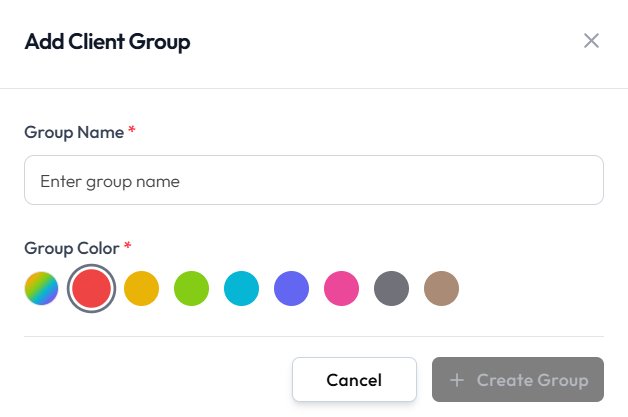
The window title is Add Client Group.
Step 3 — Enter the Group Name
Group Name is required. Use a name staff will recognise, such as Beginners.
Step 4 — Choose a Colour
Group Color is required. Click one of the colour circles. The selected colour has a ring around it.
Colour is for recognition on the group list. See Group Colours.
Step 5 — Create the Group
- + Create Group saves the group.
- Cancel or the X closes the window without creating it.
Create Group stays unavailable until the required fields are filled.
After Saving
The new group appears on Manage Groups with its name and colour. You can then Assign Clients to it.
Manage Group Members
Use this to add a client to a group, remove them from a group, or change which groups they belong to.
A client can belong to more than one group. When you Add a Client, the form says: Assign this client to one or more groups. When you Edit a Client, GROUPS is Select Groups….
Where Membership Appears
- On the Clients list, in the GROUPS column (No Groups Assigned if none)
- On the full client page, Assign Groups and group badges (for example Multiple Classes)
- When you create a client, under Select Groups…
- When you edit a client, under GROUPS
Create and name the groups themselves on Manage Groups.
Add a Client to a Group
Step 1 — Find the Client
Open People → Clients. Search for the person, such as Noah Williams.
Step 2 — Open Edit
You can assign groups when you Create the Client.
To change groups later, open Client Detail, click the pencil, then open GROUPS.
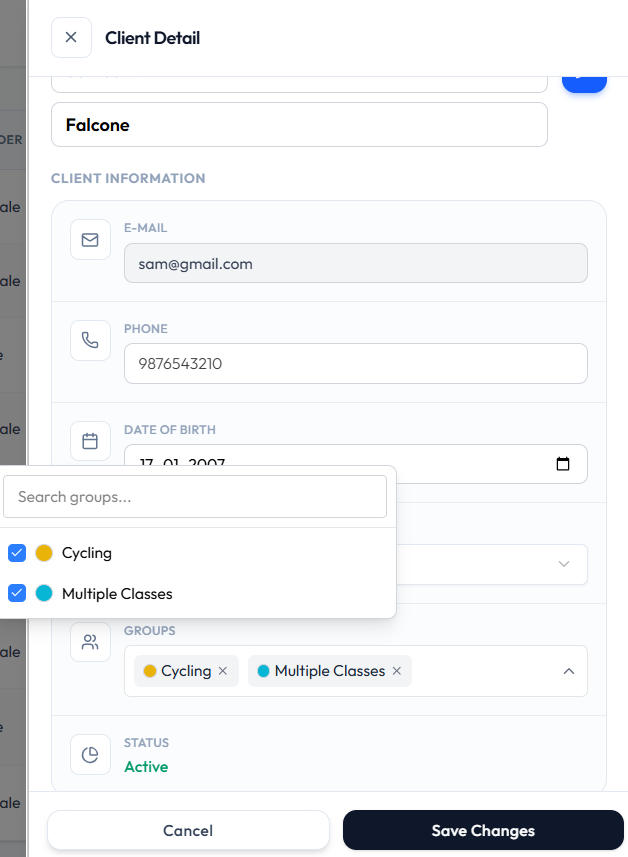
- Selected groups appear as tags, such as Cycling and Multiple Classes
- Open the list to see Search groups…
- A checkmark shows a group that is already assigned
Step 3 — Save
Click Save Changes so the GROUPS column and Client Detail show the new membership. Cancel closes without saving.
Remove a Client from a Group
Step 1 — Find the Client
Open People → Clients and find the row that already shows a group.
Step 2 — Remove the Group
Open Client Detail, click the pencil, then open GROUPS. Remove the tag or clear the checkmark for that group.
Step 3 — Save
Click Save Changes.
Removing a client from a group does not delete the client. You cannot Delete a Client. Group membership and Deactivate are different actions.
Move a Client Between Groups
Because a client can belong to more than one group, you add or remove groups rather than moving them from a single group.
To change which groups apply:
- Find the person.
- Edit their groups.
- Click Save Changes.
Edit & Delete a Group
Edit a group when the name or colour should change. Delete a group when that label should no longer exist.
Deleting a group is not the same as removing a client. You cannot Delete a Client in Fitnez Studio. Do not assume clients in the group are deleted when you delete the group.
Work from People → Clients → Manage group. The group list and ACTION menu (⋯) are on that page. See Client Groups.
Edit a Group
Step 1 — Open Manage Groups
Open People → Clients, then click Manage group.
Step 2 — Open the Group
Use Search groups… if you need to find the name. Open the ACTION menu (⋯) on that row and choose Edit.
Step 3 — Change the Details
The window title is Edit Client Group.
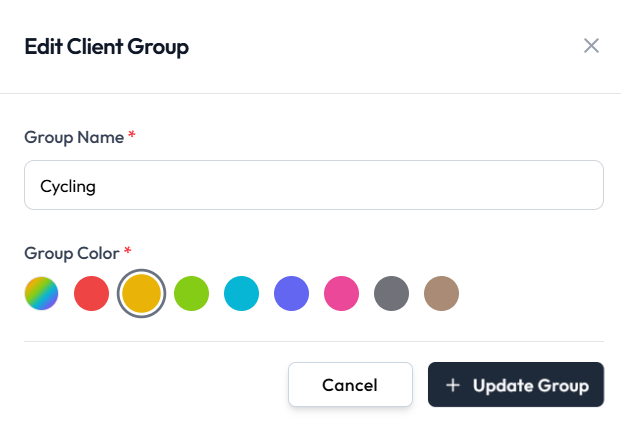
- Group Name (required)
- Group Color (required) — click a colour circle. The selected colour has a ring around it
Step 4 — Save
- + Update Group saves the group
- Cancel or the X closes the window without saving
Delete a Group
Use delete when the group should no longer be used — for example a programme that has ended.
Step 1 — Find the Group
Open Manage Groups and locate the group you no longer need.
Step 2 — Choose Delete
Open the ACTION menu (⋯) and choose Delete (shown in red).
Step 3 — Confirm
The confirmation title is Are you sure?
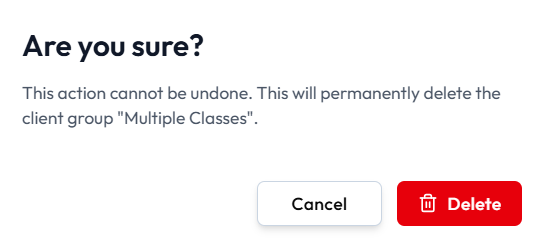
The message is: This action cannot be undone. This will permanently delete the client group and the group name.
- Cancel closes the dialog without deleting
- Delete (red, with a trash icon) permanently deletes the group
What Happens to Clients in the Group
Group deletion and stopping a client are separate.
The confirmation does not say what happens to clients in the group. This guide does not say that clients are deleted, kept, or moved. Confirm the result in Fitnez Studio before you delete a group that still has people in it.
Until that result is confirmed:
- Do not treat group delete as a way to remove customers.
- To stop a person without removing their record, use Deactivate.
- To take a person out of a group only, use Manage Group Members.
Group Colours
Give a group a colour so staff can recognise it at a glance — for example one colour for Beginners and another for Personal-training clients.
A colour is for recognition. It does not change what the group can do.
Why Colour Is Useful
On Manage Groups, each row shows a colour swatch next to the name. That is faster to scan than reading every group name.
The page description is: Create and manage client groups with color coding for better organization.
Where Colour Is Selected
Colour is a required field when you Create a Group or Edit a Group. The field is labelled Group Color. Click a colour circle to select it.
Where Staff See It
On Manage Groups, the COLOR column shows the swatch and the colour code for each group.
Colour on the Clients GROUPS column is not confirmed as a colour swatch. On Client Detail, selected groups can show a colour dot on the tag.
What Colour Does Not Do
Colour does not, by itself:
- Change pricing
- Restrict bookings
- Assign packages
- Change permissions
Those limits match What a Group Can and Cannot Do.