Reports & Analytics
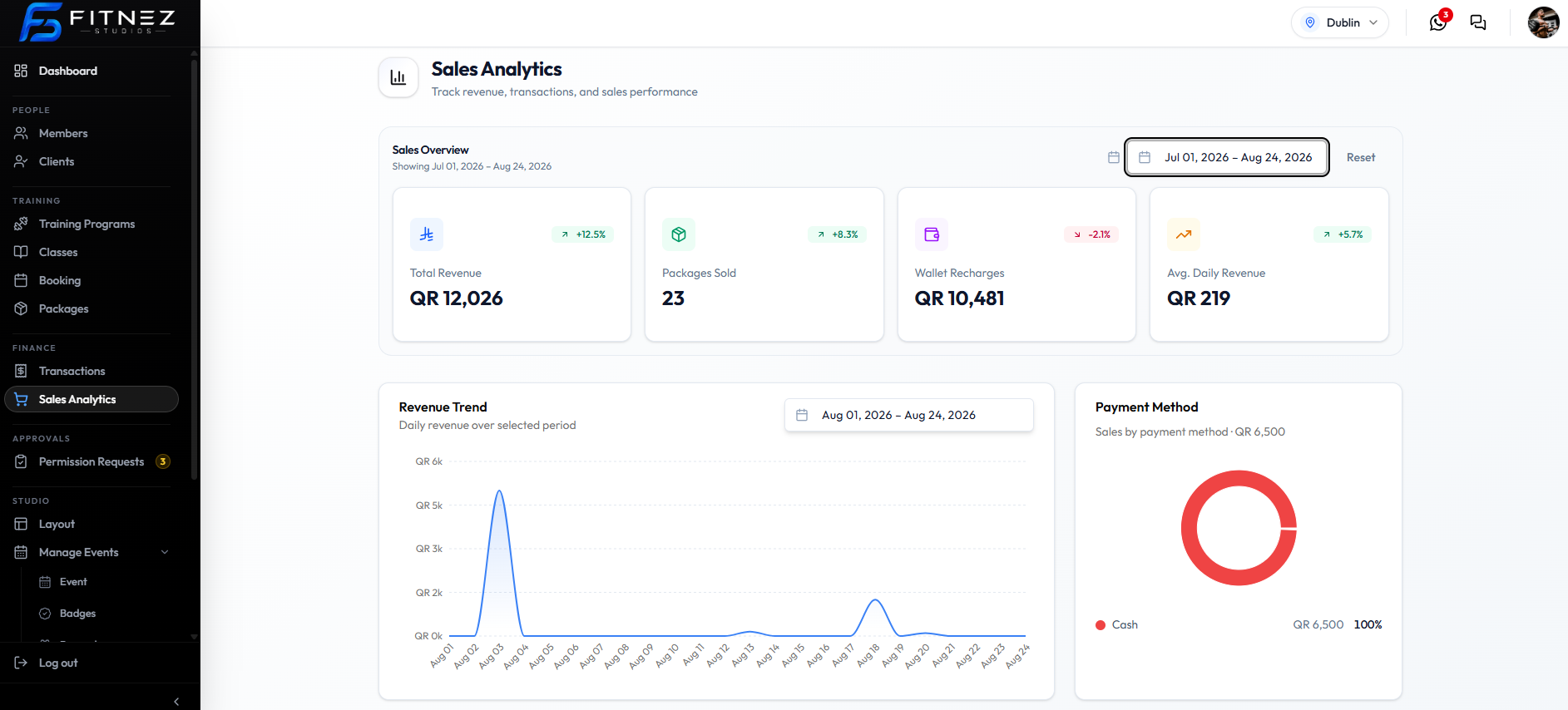
Sales Analytics is the screen for studio-wide sales figures. Open Finance → Sales Analytics.
The page title is Sales Analytics. The subtitle is Track revenue, transactions, and sales performance.
Use it when Sophie Bennett needs totals and trends — not when Daniel Murphy needs one member’s invoice. Individual payments stay under Finance → Transactions. See The Sales Ledger.
Choose a date range → Read the metric → Compare the change
Operational Data Versus Analytics
| Operational screens | Sales Analytics |
|---|---|
| One sale, booking, package, or wallet change | Totals and charts for a period |
| Transactions, All Bookings, Packages | Sales Overview, trends, rankings |
Example: the ledger is for Emma Wilson’s purchase. Analytics is for how much the studio took in across Jul 01, 2026 – Aug 24, 2026.
What This Page Shows (Confirmed)
| Area | What it is |
|---|---|
| Date range + Reset | Period for Sales Overview (on this screenshot Jul 01, 2026 – Aug 24, 2026) |
| Total Revenue | QR 12,026 with +12.5% |
| Packages Sold | 23 with +8.3% |
| Wallet Recharges | QR 10,481 with -2.1% |
| Avg. Daily Revenue | QR 219 with +5.7% |
| Revenue Trend | Line chart: Daily revenue over selected period |
| Payment Method | Donut: Sales by payment method • QR 6,500, Cash 100% |
| Wallet Recharge vs Package Sales | Monthly bars — Wallet vs Package |
| Revenue Summary | This Month’s Revenue — Revenue This Month |
| Top Buyers of the Month | Ranked by spending — Top Buyers |
| Top Selling Packages | Ranked by units sold — Top-Selling Packages |
Currency on this screen is QR. Location in the header is Dublin.
Total Revenue includes both package sales and wallet recharges. The Overview cards still show those two as separate figures as well.
View All on Top Buyers and Top Selling Packages does not open another page. Clicking a buyer or package row does not open a record.
How refunds or failed payments affect totals is not on the screenshots. Booking Analytics, Occupancy, Trainer Statistics, and Export or Share are listed in this section and will be completed when those screenshots exist.