Packages
A package is what a member buys — a membership, class pack, or session bundle. Staff create and review packages on Training → Packages.
What Is a Package?
A package is a sellable offer. It is not a Class, and it is not a Booking. The class is the session. The booking is the reservation. The package is how the member pays for sessions.
Examples on the catalogue:
- Peak Fit (RECURRING)
- FREE ONE TIME RIDE (ONE TIME)
- Corporate Wellness (RECURRING, Private)
Package Versus Pricing Versus Discount
| Term | What it is |
|---|---|
| Package | The offer itself — name, category, purchase type, validity |
| Pricing | Plans on that offer (price, sessions, persons, unlimited). Edited under Pricing |
| Discount | A reduction you create and attach to a pricing plan |
Where to Find Packages
Open Training → Packages in the left-hand menu.
The page title is Packages. The description is: Manage your membership packages and pricing plans.
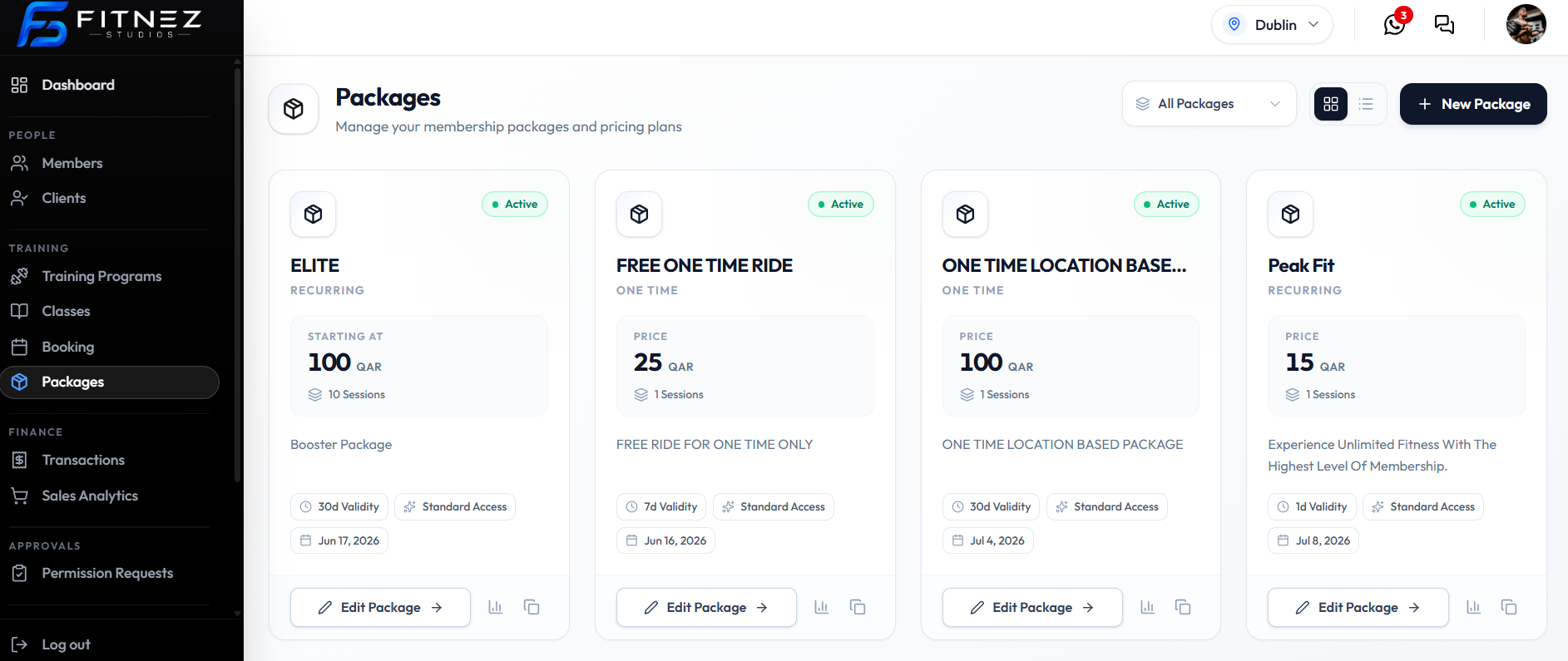
What You See
| Item | What it is |
|---|---|
| All Packages / Public / Private | Catalogue filter |
| Grid / List | Whole-package cards or table rows. See View All Packages |
| + New Package | Starts Create Package (3 steps) |
| Active | Status on cards and list rows |
| Private | Hidden from the public listing |
| RECURRING or ONE TIME | Purchase type |
| Price & sessions | Amount in QAR and session count |
| Edit Package | Opens Editing |
| Chart / duplicate icons | Performance and Duplicate |
What You Can Do
- Create a Package — Package Type → Purchase Type → Details
- View All Packages in grid or list
- Edit Basic Details and Pricing
- Duplicate a package
- Work with Pricing and Discounts
- Assign a Package to a Member
How It Works
- Create the package in three steps (category, buy rules, name & validity).
- Open Edit Package and set Pricing (and Discounts if needed).
- Keep Status Active when it should be for sale.
- Use Private Package when it should stay off the public listing.
- Assign it when a member buys or is given the offer.
Important Information
- Currency on screen is QAR.
- Create Package does not include pricing plans — those are on Edit → Pricing.
- Category limits are on Package Restrictions.
- What happens to existing Bookings when a package expires is not confirmed.
Create a PackageView All PackagesOne-Time vs RecurringEdit a PackagePricingDiscountsPackages on a Member
Frequently Asked Questions
Where do I create what members can buy?
Training → Packages, then + New Package.
Is a package the same as a class?
No. A class is one session. A package is what the member buys to attend sessions.
Last updated on