Activity Types
Recent Activity on the captured Dashboard does not show booking created, cancelled, or check-in rows.
To see reservations, open Training → Booking → All Bookings. Statuses on that list are Confirmed and Cancelled.
To see sessions for a Dashboard day, use the Classes block, then a class row or View all >. See Open a Class from the Dashboard.
There is no check-out action to log.
Emails can still use Booking Created and Booking Cancelled. That is Email Templates, not Recent Activity.
Related Articles
Waiting-List Activity
Dashboard On Waitlist can show a count (for example 2). Recent Activity does not show waitlist joined, removed, or promoted rows on the captured list.
If a member says they were on the waitlist and now they are not:
- Open the Class or Roster.
- Use Waiting List actions as documented there.
- Do not expect a waitlist row on Recent Activity until one appears in a screenshot.
Automatic promotion from waitlist to class is still not confirmed. See Class Capacity & Waitlist.
Package Activity
Two package events appear on Recent Activity:
| Title | Description on screen |
|---|---|
| Package Sold | (1) Sold to (2) Using (3) By Team member (4) |
| Package Validity Updated | Validity of (1) For (2) Changed (3) |
Times on the capture: 3 days ago.
That matches work described in Assign a Package and Change Validity. Session adjustments and removals are not on this list.
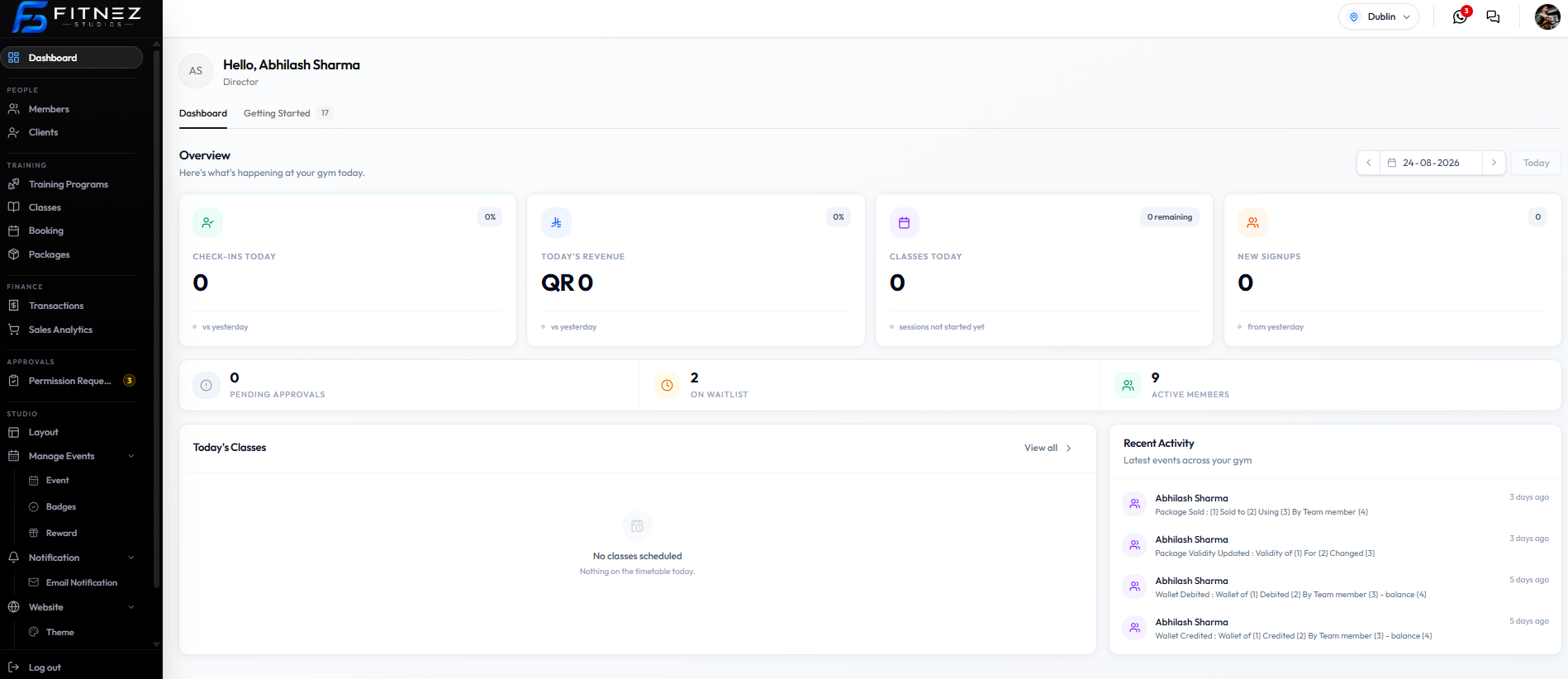
Placeholders (1)–(4) are still on the screenshot. When they fill in, they should be package, member, method, and team member.
For the current held package, open the member — not only this list. See Packages on a Member.
Wallet Activity
Two wallet events appear on Recent Activity:
| Title | Description on screen |
|---|---|
| Wallet Debited | Wallet of (1) Debited (2) By Team member (3) - balance (4) |
| Wallet Credited | Wallet of (1) Credited (2) By Team member (3) - balance (4) |
Times on the capture: 5 days ago.
That matches Deducting Money and Adding Money. If the credit needed a manager, also check Approval Requests for Wallet Credits.
A reason field is not on the Recent Activity row. Approval Request cards can show a reason. Wallet history screens are still not captured.
Dashboard Today’s Revenue on this screenshot shows QR 0. That is Overview, not the wallet row amount.