Approval Requests
An approval request is how staff ask a manager to allow a change they cannot make themselves. Limited roles can still get work done without full admin access.
The sidebar item is Approvals → Permission Requests. The page title is Approval Requests. The description is: Review and decide on requests raised by your team.
What Is an Approval Request?
It is a recorded ask: what should change, for whom, why, and whether a manager accepted it.
It is not the same as doing the action directly. Daniel Murphy (front desk) cannot always credit a Wallet. He submits a request. Sophie Bennett (manager) reviews it on Approval Requests.
Why Businesses Use This
- Junior staff can raise a change without having every permission
- Managers see money and membership changes before they happen
- Each request keeps a reason and, after a decision, a Review note
Direct Action Versus Request
| Approach | When it happens |
|---|---|
| Direct | The person’s Role can complete the change |
| Request | They cannot complete it, so they submit it for a decision |
Lifecycle
Request → Pending → Decision → Action
- Staff start a restricted action and submit a request with a reason.
- The request waits (Pending).
- A manager Approves or Rejects it (and can add a Review note).
- The change should go through only if the workflow allows it after Approved.
Who can raise a request, who can approve, and whether approval runs the change automatically are not fully confirmed. See Choosing Who Should Approve.
Where to Find It
Open Approvals → Permission Requests.
You can also see a count of waiting items on the Dashboard under Needs attention → Pending approvals. See Pending Approvals on the Dashboard.
Confirm you are in the correct Location.
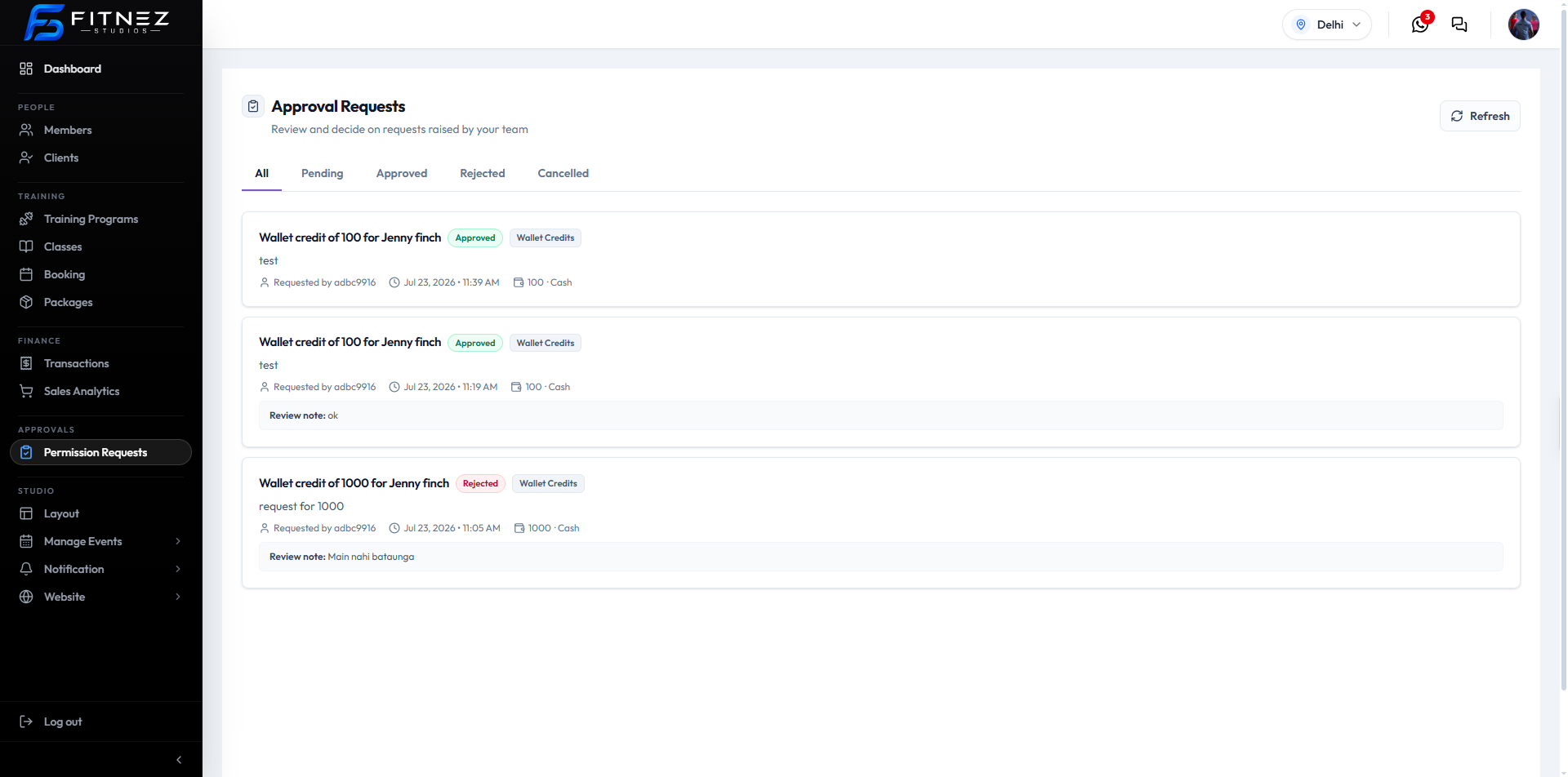
What You See
| Item | What it is |
|---|---|
| Refresh | Reloads the list |
| All | Every request |
| Pending | Waiting for a decision |
| Approved | Accepted |
| Rejected | Not accepted |
| Cancelled | Withdrawn or cancelled |
Each card can show:
| Item | What it is |
|---|---|
| Title | For example Wallet credit of 100 for a member name |
| Status | Approved (green) or Rejected (red) in this screenshot |
| Category | Wallet Credits on these cards |
| Reason | The text the requester entered |
| Requested by | Who submitted it |
| Date and time | When it was submitted |
| Amount and method | For example 100 · Cash |
| Review note | The approver’s note after a decision, when shown |
Example
Daniel Murphy at FITNEZ STUDIO in Dublin needs to credit Emma Wilson’s wallet after a studio closure. He cannot change the wallet directly, so he submits a request. Sophie Bennett opens Approvals → Permission Requests, reads the reason, and approves or rejects it.
The current screenshot shows Wallet Credits requests. Other request types are on Which Actions Need Approval.
What You Can Do
- See Which Actions May Need Approval
- Raise a Request
- Track Status
- Review Pending Requests
- Approve or Reject
- Cancel a Request You Raised, if Fitnez Studio allows it
If You Cannot Open Approval Requests
Your Role may not include Approvals. Ask a manager.
Frequently Asked Questions
Where is this in the menu?
Approvals → Permission Requests. The page title is Approval Requests.
Is this the same as a sale?
No. A Sale is money changing hands. An approval request is a decision about a change someone could not make themselves.