Badges
A badge is recognition for an achievement — for example a fitness streak. Staff create the artwork here; a Badge Reward is how you attach it to a challenge.
Open Studio → Manage Events → Badges. The page title is Badges Management. The description is: Create achievement badges and reward your members’ milestones.
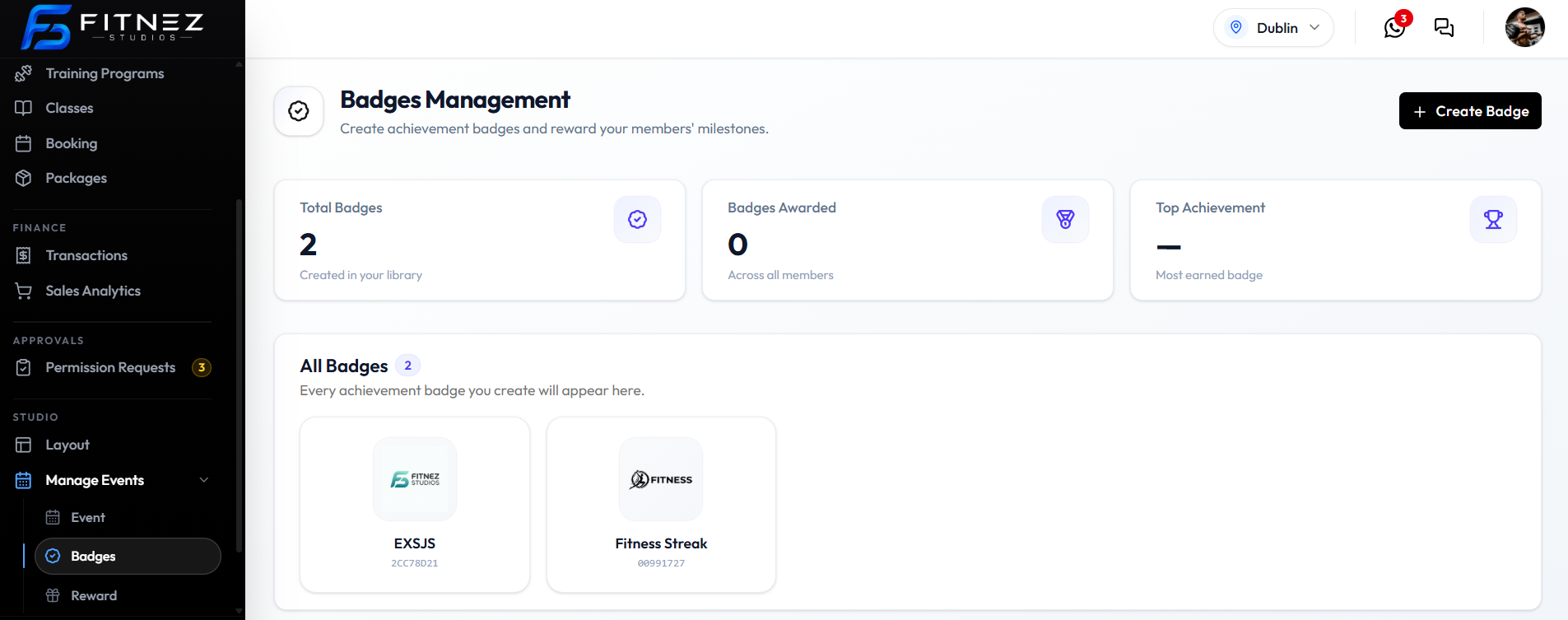
What You See
| Item | What it is |
|---|---|
| + Create Badge | Opens Create Badge |
| Total Badges | How many are in the library, such as 2. Subtitle: Created in your library. |
| Badges Awarded | Across all members, such as 0 |
| Top Achievement | Most earned badge, or — if none |
| All Badges | Gallery of badges. Subtitle: Every achievement badge you create will appear here. |
Each card shows the icon, a name (such as Fitness Streak), and an ID under the name.
Why Badges Matter
Badges mark milestones without always giving sessions or wallet money. Short names work well — Fitness Streak, Consistency Champion, First Challenge.
Badge Versus Reward
| Badge | Reward |
|---|---|
| Artwork and name under Badges | Prize under Reward |
| Created with Name and Icon | Type can be Badge, Package, or Wallet Credit |
| Can be granted by a Badge Reward | Can also be a package or wallet credit |
How Badges Are Awarded
Challenge/Event → Meet Conditions → Badge Awarded → Badge Appears for the Member
Badges Awarded is 0 on this screenshot. Automatic awarding is not confirmed. See How Members Earn & See Their Badges.
Client Detail does not show badges.
Creating a Badge
Create a badge so you can attach it as a Badge Reward and so members have something recognisable to earn.
Use a short name and a clear icon — for example Fitness Streak.
Workflow — Create a Badge
Badges → + Create Badge → Name → Icon → Create Badge
Step 1 — Open Badges
Open Studio → Manage Events → Badges.
Step 2 — Click Create Badge
Click + Create Badge. The modal title is Create Badge. The subtitle is: Add an achievement badge to reward your members’ milestones.
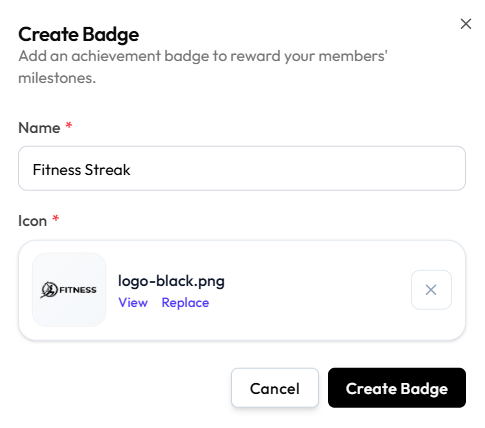
Step 3 — Add Name and Icon
| Field | What it is |
|---|---|
| Name | Required. For example Fitness Streak |
| Icon | Required. Upload an image. After upload you can View, Replace, or clear with X |
There is no description field on this form. Achievement criteria belong on the Challenge, not on the badge.
No file-size or pixel limits are shown.
Step 4 — Save
Click Create Badge, or Cancel / X.
The badge appears under All Badges with its icon, name, and ID.
Editing or Deleting a Badge
Edit a badge when the name or icon should change. Delete it when it should not stay in the library.
Open a badge from All Badges. The modal title is Edit Badge. The subtitle is: Update this badge, or delete it.
Edit
Step 1 — Find the Badge
Open Studio → Manage Events → Badges.
Step 2 — Open Edit Badge
Open the badge, such as Fitness Streak.
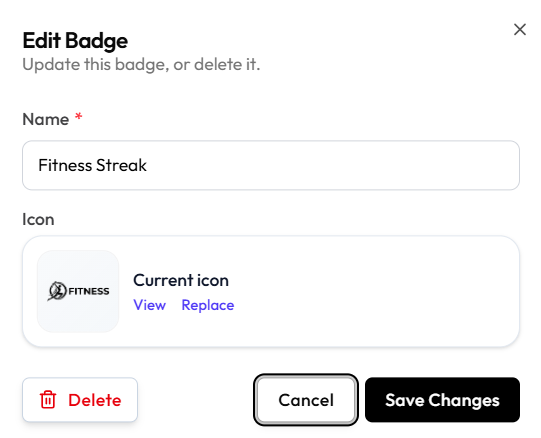
Step 3 — Change and Save
Update Name if needed. For Icon, use View or Replace.
Click Save Changes, or Cancel / X.
Do not assume earned badges on member records update automatically when you change the icon. Badges Awarded on the list is a count only.
Delete
Step 1 — Open Edit Badge
Find the badge and open Edit Badge.
Step 2 — Click Delete
Click Delete (red, trash icon) on the left of the footer.
Step 3 — Confirm
A warning appears: Delete this badge? This can’t be undone.
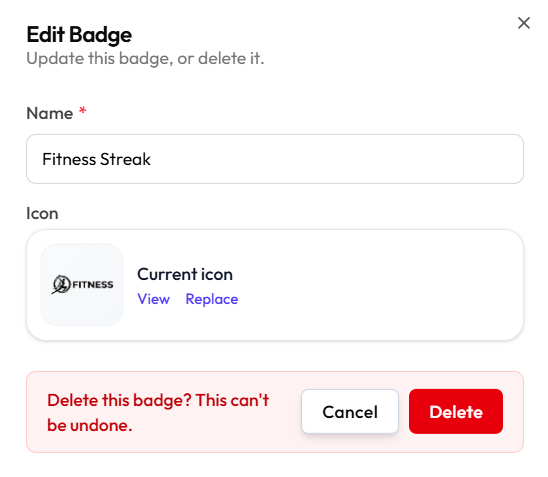
Click Delete to remove it, or Cancel to keep the badge.
What happens to challenges that already use this badge, and to badges members already earned, is not shown beyond This can’t be undone.
How Members Earn & See Their Badges
Members should earn a badge by completing a Challenge that uses a Badge Reward. Staff then need to know where that badge appears.
Intended Journey
Challenge/Event → Meet Conditions → Badge Awarded → Badge Appears in the Member Area
Workflow — Award a Badge Through a Challenge
Create Challenge → Set Conditions → Select Badge Reward → Activate → Member Meets Target → Badge Awarded
Step 1 — Create the Challenge and Badge
Create the Badge, Create the Challenge, and Attach a Badge Reward.
Step 2 — Activate
Set Status to Active when the campaign should run. See Event Statuses.
Step 3 — Member Meets the Target
Emma Wilson books or purchases according to the Conditions. Whether progress is automatic from Bookings is not confirmed.
Step 4 — Badge Is Awarded
Staff can see Badges Awarded on Badges Management (Across all members). That count is 0 in the current screenshot. Automatic awarding is not confirmed. Do not tell staff that the badge appears the moment the target is reached until that behaviour is captured.
Workflow — Member Views Badge
Where Emma Wilson sees earned badges is not confirmed.
Client Detail does not show badges in the current screenshot. There is no Mobile App module in this help centre yet.
Do not invent member-facing navigation. Screenshot to add: member profile or app screen showing earned badges and any progress or achievement details.
Until that screen exists, staff can only confirm the challenge and reward on Manage Events. They cannot verify the member view from these docs.