Frequently Asked Questions
Scan by topic. Each answer is short. Open the linked guide for the full workflow.
This is a Help Center page. It is not a screen in the dashboard.
Examples use Daniel Murphy (staff), Sophie Bennett (admin), Emma Wilson (member), and Dublin.
Members
Why Can’t This Member Book a Class?
Check whether Emma Wilson is Active on Clients, whether the Class has remaining CAPACITY, and whether she holds a usable Package.
Check these first:
- Client status is Active, not Inactive. See Block & Unblock a Client.
- Class CAPACITY is not full (for example 0/4 vs 4/4). See Class Capacity & Waitlist.
- Header location is the site you mean (for example Dublin). See Switching Between Locations.
- Class Gender matches the member if the session is Male or Female. See Gender Restrictions.
If the issue continues: Troubleshooting — Bookings and Book a Member.
Why Can’t a Member See a Class?
Staff see Draft, Upcoming, or Past on Training → Classes. A Draft is not published. Member-facing website or app views are not captured in this Help Center.
Check these first:
- Class Status is Published / list shows Upcoming. See Publish a Class.
- You are in the correct Location.
- The session is not already Past.
If the issue continues: Class Statuses.
Why Can’t a Member Use Their Package?
The catalogue offer and the package Emma Wilson holds are different. Check remaining sessions and validity on the member, plus Package Restrictions.
Check these first:
- She Holds the Package.
- Sessions remain and validity has not ended.
- The offer is not limited by location, time, or training program.
If the issue continues: Troubleshooting — Packages & Credits.
Why Is a Member’s Credit Balance Different from Expected?
Package sessions are not Wallet money. Credits may also have been Adjusted or used on bookings. When the credit is taken (at book, check-in, or later) is not confirmed.
Check these first:
- Open Client Packages / Packages on a Member.
- Review Bookings for that member.
- Check Recent Activity for Package Sold or Package Validity Updated. See Activity Feed.
If the issue continues: Bookings & Package Credits.
Classes & Bookings
Why Can’t I Book This Class?
The class must exist, the member must be on Clients, and CAPACITY must have a free place (or use the Waiting List if WAITLIST CAP allows it).
Check these first:
- Book a Member — class and member exist.
- CAPACITY on Training → Classes.
- Booking Rules in Settings (advance window is not on Booking screenshots — confirm in the product).
If the issue continues: Troubleshooting — Bookings.
Why Is the Class Full?
CAPACITY first number has reached the second (for example 4/4). A waitlist only helps if WAITLIST CAP is greater than zero. Staff override of capacity is not confirmed.
See Class Capacity & Waitlist.
Why Did a Booking Fail?
There is no screenshot of a failed-booking message. Check eligibility, capacity, location, and package as in Book a Member.
If the issue continues: Troubleshooting — Bookings.
Why Is the Member on the Waiting List?
The class CAPACITY is full and they were added to the waitlist. They do not yet have a booked place. Automatic promotion after a cancel is not confirmed.
See Waiting List.
Why Was a Booking Cancelled?
On All Bookings, status can be Confirmed or Cancelled. Staff cancel from ⋯ → Cancel booking. What happens to credits after cancel is not confirmed.
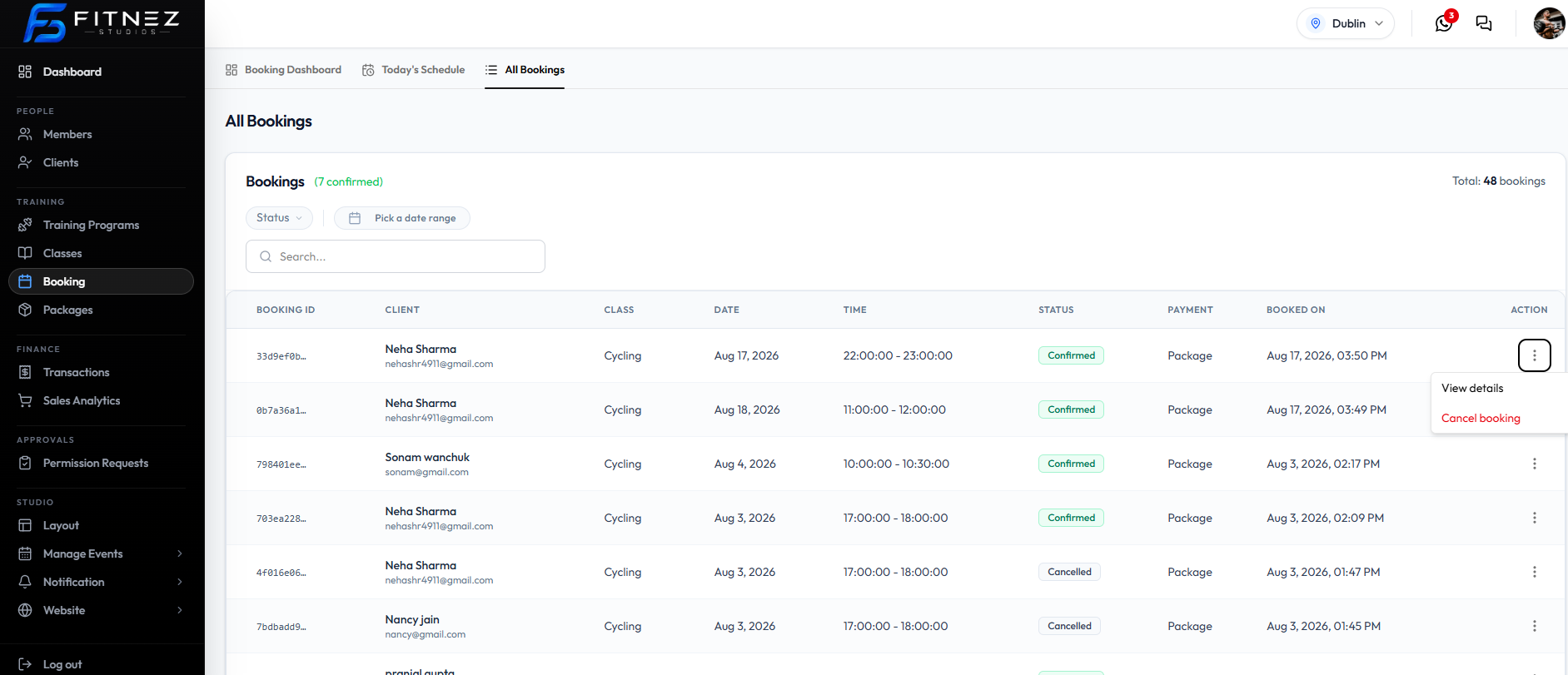
See Cancel a Booking.
Why Is a Class Not Visible to Members?
Staff: check Draft vs Upcoming, location, and Gender. A member website or app class list is not captured here.
See Publish a Class and Class Statuses.
Packages
Why Are Credits Unavailable?
Sessions on the held package may be used up, expired, or not valid for that class (location, time, or training program restriction). Deduction timing is not confirmed.
See Packages on a Member and Package Restrictions.
Why Were Credits Not Deducted?
Do not assume a credit is taken at the moment of booking. See Bookings & Package Credits.
Why Did Package Validity Expire?
Catalogue cards show validity such as 30d Validity. The date on Emma Wilson’s held package can also be Changed. Recent Activity can show Package Validity Updated.
See Extend or Shorten Validity and What the Activity Feed Records.
Why Does the Package Show a Different Number of Credits?
The catalogue 10 Sessions is not the same as remaining sessions on the member. Staff can Adjust Remaining Sessions.
Payments
Why Did a Payment Fail?
Open Finance → Transactions, set Status → Failed, and read USER, AMOUNT, METHOD, and GATEWAY. A failed attempt did not collect the money. Use ⋯ → Copy txn ref if you need the full reference.
See Refunds & Failed Payments.
Why Is a Payment Still Pending?
Set Status → Pending. Do not treat the Package as paid until STATUS is Success.
See Transaction Statuses.
Why Does an Invoice Show a Different Amount?
Find the row, then ⋯ → Download invoice. Match USER and AMOUNT. Prefix and footer come from Website Tax & Invoice.
Why Can’t I Find a Transaction?
Open Finance → Transactions. Use Status, Payment method, Source, Gateway, Pick a date range, and Search….
See The Sales Ledger.
How Do I Correct a Payment Mistake?
There is no universal Undo. Retry payment or record Cash if you have the money; Credit / Debit the wallet when needed; ask a manager if a refund is required outside the current row menu (Copy txn ref, Download invoice, Send invoice).
See How Do I Correct a Mistake Made Yesterday?.
Wallet
Why Is the Wallet Balance Different?
Wallet is money, not package sessions. Check wallet history if the product shows it, Recent Activity (Wallet Credited / Wallet Debited), and Approval Requests for Wallet Credits.
See Member Wallet and Wallet Activity.
Why Was Money Added to or Deducted from the Wallet?
A staff user credited or debited the wallet, or a manager approved a request. Open Who Changed This?.
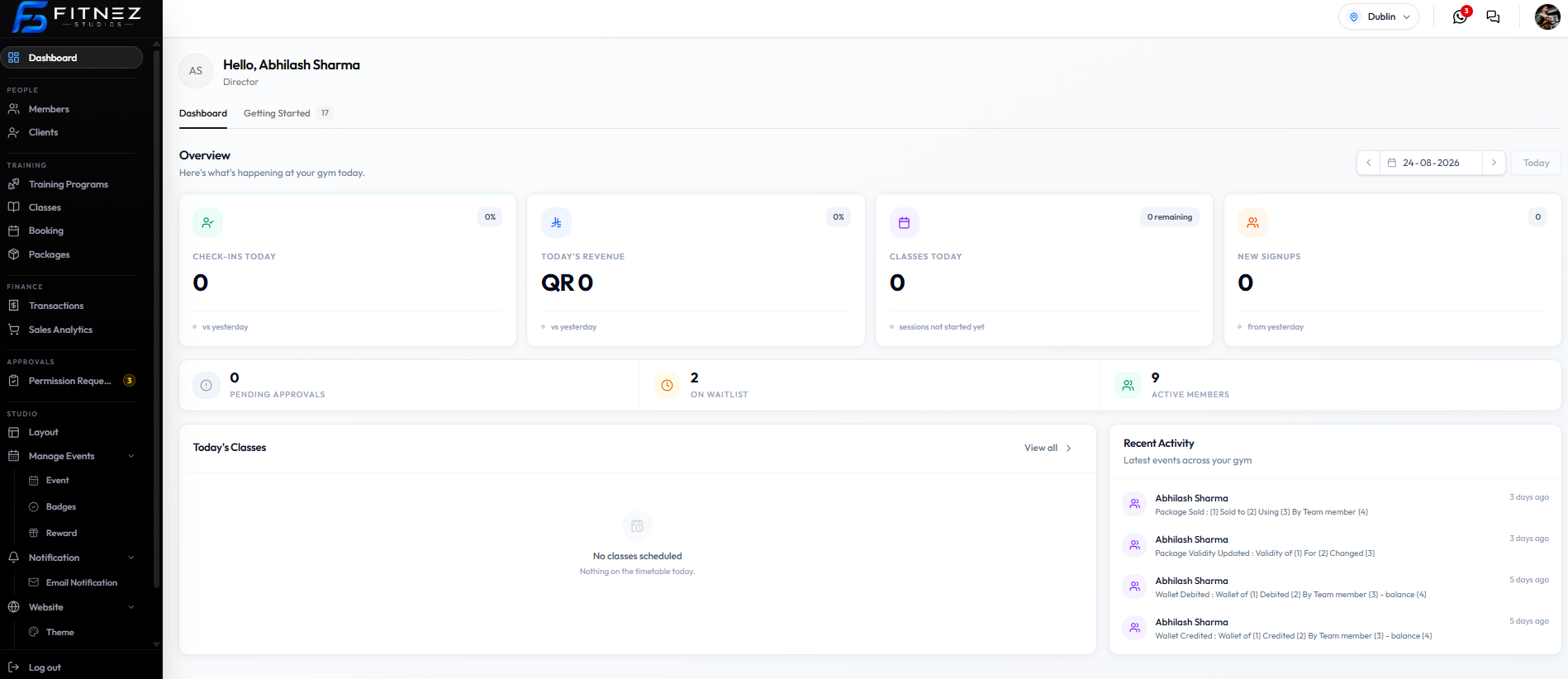
Who Changed the Wallet Balance?
Recent Activity names the team member on Wallet Credited and Wallet Debited rows. There is no staff filter on that list.
See Who Changed This?.
Notifications & Emails
Why Didn’t the Member Receive an Email?
The event must have an Active template on Studio → Notification → Email Notification. Check Emma Wilson’s email on Clients.
Check these first:
- Event Type has an Active template.
- Template is not Inactive. See Turning Notifications on & Off.
- Member email is correct.
If the issue continues: Troubleshooting — Emails Not Received.
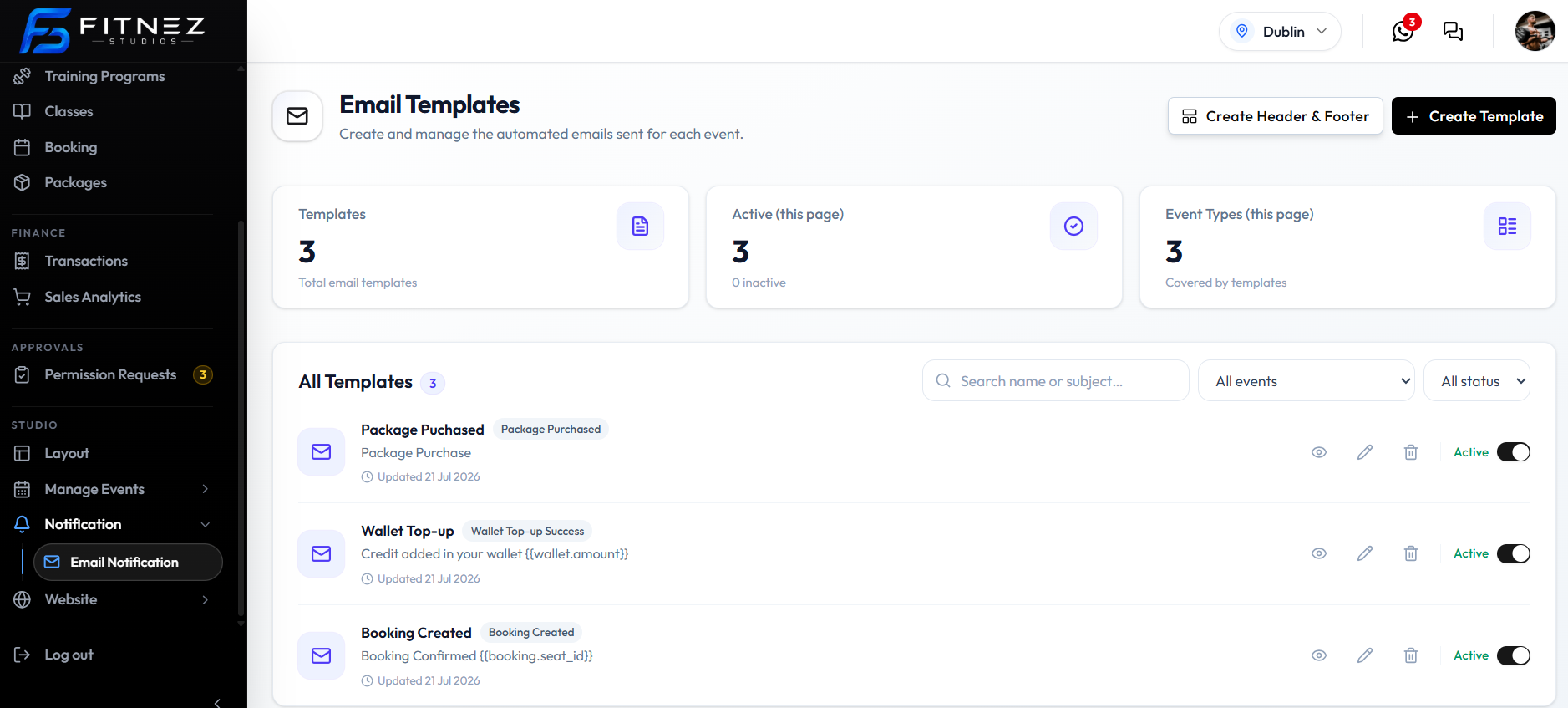
Why Didn’t the Member Receive a Booking Confirmation?
Use Booking Created or Booking Confirmed templates (both are on All events). The captured Booking Created subject is Booking Confirmed {{booking.seat_id}}.
See Which Events Can Trigger an Email.
Why Didn’t the Waiting-List Email Arrive?
Need Waitlist Joined or Waitlist Promoted as an Active template, and the member actually on the Waiting List.
See Waiting-List Update Emails.
Why Didn’t the Birthday Email Arrive?
Birthday is not an Event Type on Email Templates. Do not expect an automatic birthday send from that list.
See Birthday Messages.
Why Isn’t the Email Template Being Used?
It must be Active — used for automatic sends and match the Event Type that occurred.
See Activating or Deactivating a Template.
Permissions
Why Can’t I See This Button?
Your Role may not include the action, the Location may be wrong, or Setup may be incomplete. Do not use another person’s login.
See Why a Feature Is Not Visible and Troubleshooting — Permissions.
Why Can’t I Edit This Record?
View keys (for example booking.view) are not the same as create / edit. Sophie Bennett as ADMIN has a larger set than Daniel Murphy as STAFF.
See Checking What You Are Allowed to Do.
Why Can Another Staff Member Perform This Action but I Cannot?
Different Roles and Permissions. Some wallet credits need Approval Requests.
Why Do I Only Have View Access?
Your role may include view keys without edit keys. Ask an authorised administrator to change your role on People → Members. You cannot edit your own role on User profile.
Account
How Do I Update My Profile?
Header photo → Profile. Edit name, phone, designation, gender, date of birth, then Save changes. Email address is not edited on that form.
How Do I Change My Password?
User profile → Change password → Update password. New password must be at least 8 characters.
How Do I Sign Out?
Header Logout, sidebar Log out, or WORKSPACE Settings → Log out.
See Signing Out.
Why Can’t I Access a Particular Location?
Open SELECT LOCATION in the header. If the site is not listed, ask an administrator. You cannot add a location from User profile.
See Switching Between Locations.
How Do I Correct a Mistake Made Yesterday?
There is no Undo button. The correction depends on what changed.
| What was wrong | What to do |
|---|---|
| Booking | Open All Bookings → Cancel booking or the supported edit. See Cancel a Booking and Change a Booking. |
| Package | Review the held package; Adjust Sessions or Validity if your role allows it. |
| Wallet | Credit or debit if allowed, or raise a Wallet Credits request. |
| Payment | Open the transaction. Use Refunds only if the product supports that action. Do not mark a failed payment successful by hand. |
| Settings / configuration | Change the relevant Settings page. |
| Unsure who changed it | Recent Activity for package and wallet events. Bookings are not on those captures — use All Bookings. |
If the issue continues: Ask Sophie Bennett or another authorised administrator.