Notifications
Automated member emails are managed on Email Templates. The page description is: Create and manage the automated emails sent for each event.
Open Studio → Notification → Email Notification.
This is not the bell in the header. The header bell is the staff inbox. See Dashboard Overview.
System event → Active template → Personalised email → Member
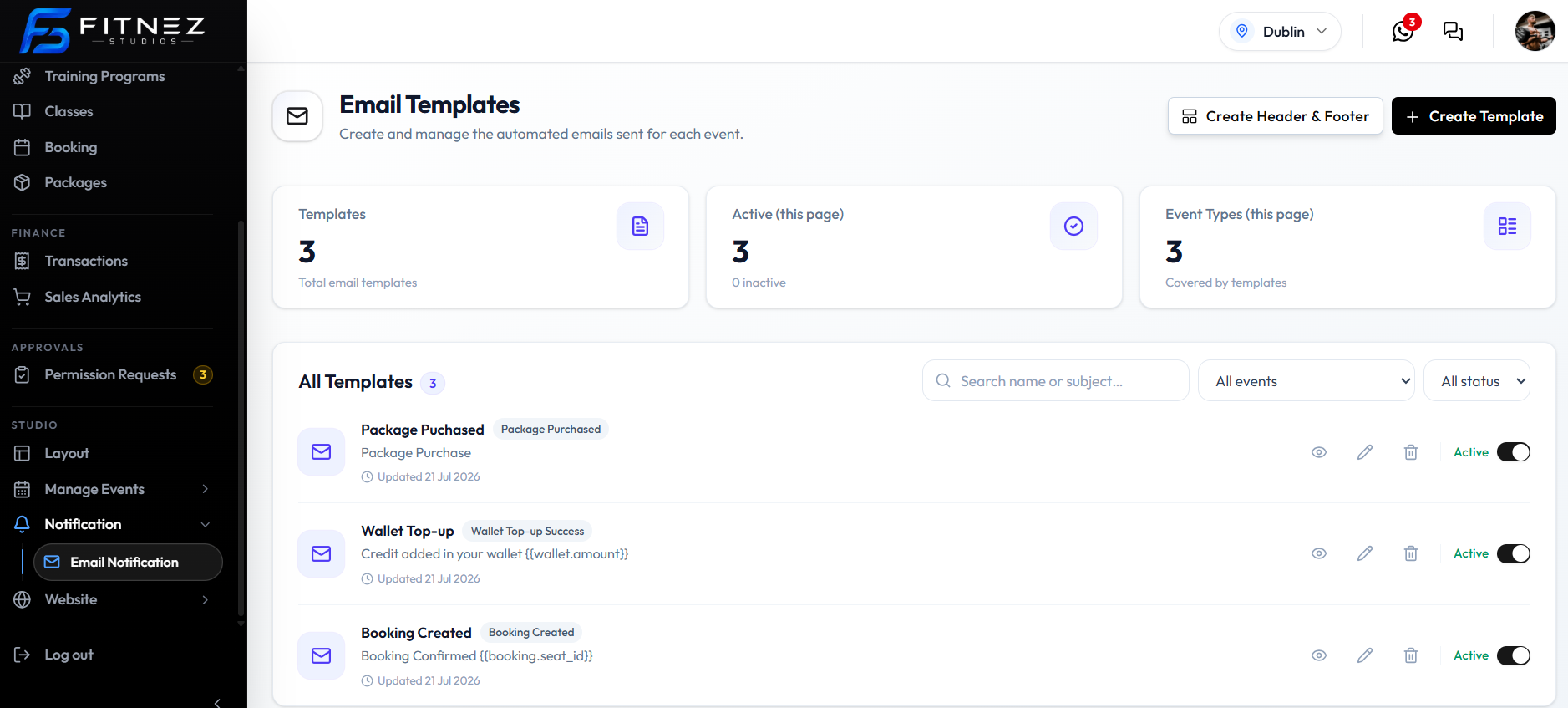
Where to Find It
Confirm you are in the correct Location. The screenshot uses Dublin.
What You See
| Item | What it is |
|---|---|
| Create Header & Footer | Global branding for every email. See Email Header & Footer |
| + Create Template | Opens Create Template |
| Templates | How many templates, such as 3 |
| Active (this page) | For example 3 Active, 0 inactive |
| Event Types (this page) | How many event types are covered, such as 3 |
| All Templates | The list, with a count badge |
| Search name or subject… | Finds templates by name or subject |
| All events | Filter by Event Type |
| All status | All status, Active, or Inactive |
Each row shows:
| Item | Example |
|---|---|
| Template name | Package Purchased, Wallet Top-up, Booking Created |
| Event tag | Package Purchased, Wallet Top-up Success, Booking Created |
| Subject | For example Package Purchase, or Credit added in your wallet {{wallet.amount}} |
| Updated | Date, such as 21 Jul 2026 |
| View (eye) | Preview |
| Edit (pencil) | Edit Template |
| Delete (trash) | Delete Template |
| Active toggle | Active — used for automatic sends. See Turning Notifications on & Off |
How It Fits Together
| Piece | What it does |
|---|---|
| Event Type | What happened — for example a Package purchase |
| Template | Name, subject, and body for that event |
| Active | Whether Fitnez Studio uses it for automatic sends |
| Header & Footer | Branding on every template, preview, and sent email |
There is no separate notification-settings screen in these screenshots. The row toggle is the send switch.
What You Can Do
- See Every Event That Can Send Mail
- Create a Template
- Set the Global Header and Footer
- Use Placeholders
- Preview, Edit, or Delete
Which Events Can Trigger an EmailCreating an Email TemplateEmail Header & FooterUsing PlaceholdersWaiting-List Update EmailsTurning Notifications On & Off
Frequently Asked Questions
Where is this in the menu?
Studio → Notification → Email Notification. The page title is Email Templates.
Is this the header bell?
No. The bell is for staff. This page is member email.
Last updated on