Training Programs
A training program is the type of training you offer — for example Cycling, Zumba, or Yoga. You create programs first, then run Classes from them.
This section also covers Studio Layouts: when Layout Required is on for a program, classes of that type need a floor plan of bookable spots.
What Is a Training Program?
A training program describes what you teach. It is not one session on the timetable.
Use a program when the same type of training will be offered many times — different days, trainers, or rooms — without recreating the type each time.
Program Versus Class Versus Schedule
These three terms are easy to mix up. Use them this way:
| Term | Meaning | Example |
|---|---|---|
| Training program | The type of training offered | Cycling |
| Class | One session at a specific date and time | Cycling — Monday 6:00 PM |
| Schedule | A repeating timetable that creates many classes | A weekly Cycling timetable |
A program does not replace a class. A class is one occurrence. A schedule is how many classes are generated over time.
On Training → Classes, each row is a class. The class name matches the program, such as Cycling or Lifiting. See Classes.
Where to Find Training Programs
Open Training → Training Programs in the left-hand menu.
The same Training group also contains Classes, Booking, and Packages.
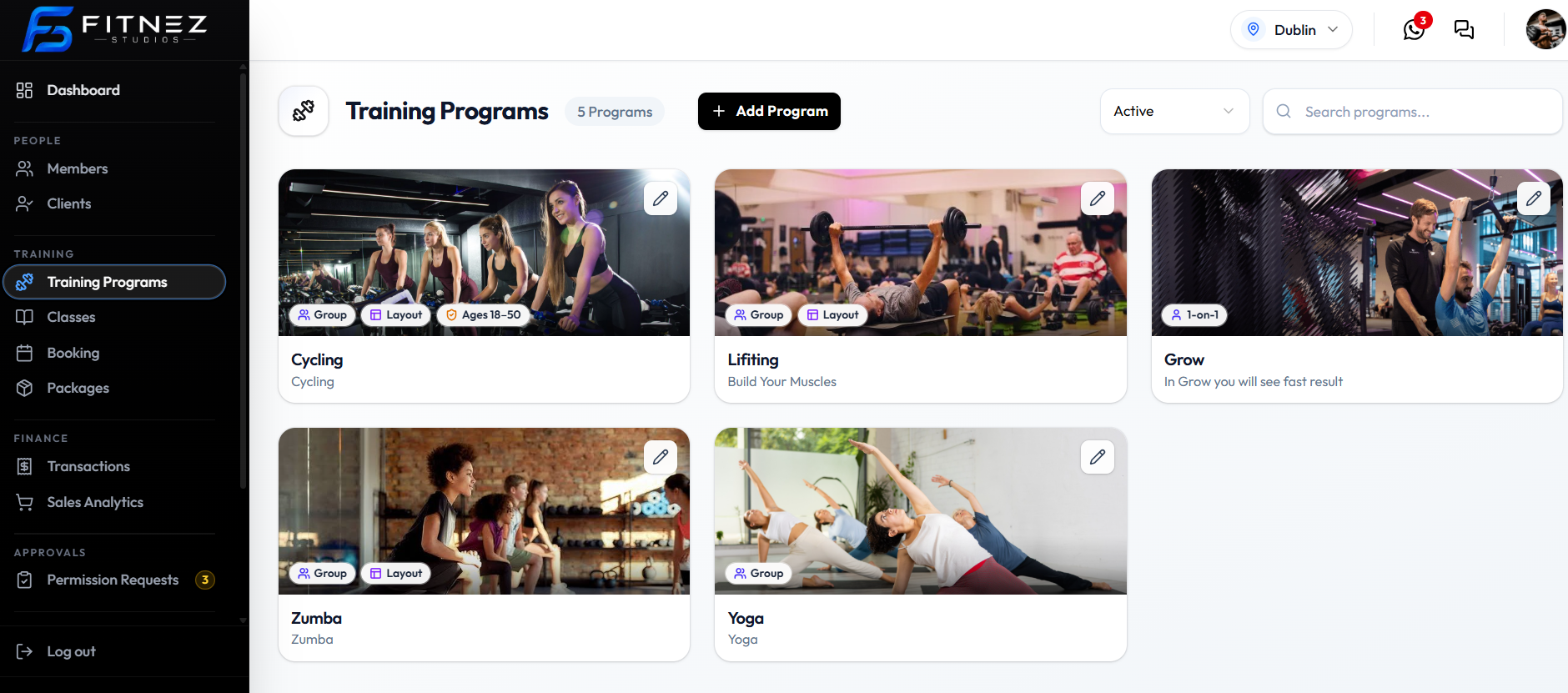
What You See on the List
Each program appears as a card with:
- A cover image
- Tags such as Group or 1-on-1, Layout, and an age range (for example Ages 18-50) when those settings are on
- Program title and details text
- A pencil control to Edit
Use + Add Program to Create. Filter by Active or Inactive, and use Search programs… to find a name. See View Training Programs.
What You Can Do
- View All Training Programs
- Create a Training Program
- Edit a Training Program
- Work with Studio Layouts when Layout Required is on
How Programs Relate to Other Features
- Locations — the form shows the current site (for example Dublin) as Default location. Switch location in the header before you work.
- Classes — a class is one session based on a program, with a date, time, trainer, and capacity.
- Studio Layouts — turn on Layout Required when the program needs a floor plan of bookable spots.
- Packages — a package can be limited by training program. See Package Restrictions.
- Media — change the cover with Change image on the card, or from the program form.
Important Information
- Creating a class does not create a new training program.
- Turning on Layout Required does not by itself create a layout editor screen in these captures — see Studio Layouts.
- A Location is the site. A layout is the floor plan inside a space.
Frequently Asked Questions
What is a training program?
The type of training you offer, such as Cycling or Yoga. It is not a single booked session.
What is the difference between a program and a class?
A program is the type. A class is one session at a date and time. See Classes.
What does the Layout tag mean?
The program has Layout Required turned on. See Studio Layouts.