Rewards
A reward is the benefit you can hand out when a member completes a Challenge.
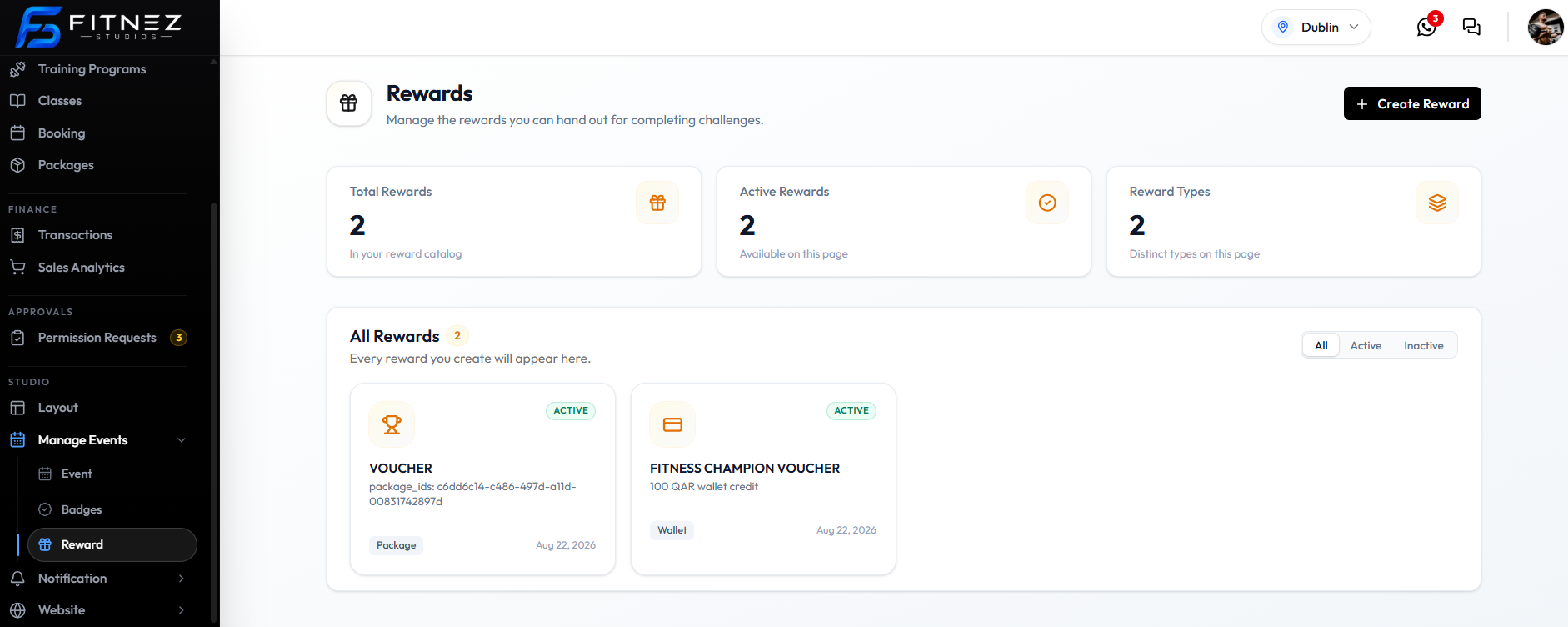
The page title is Rewards. The description is: Manage the rewards you can hand out for completing challenges.
A badge as artwork lives under Badges. A Badge reward type on this form grants that badge as the prize.
Where to Find Rewards
Open Studio → Manage Events → Reward.
What You See
| Item | What it is |
|---|---|
| + Create Reward | Opens the create form |
| Total Rewards | How many rewards are in the catalog, such as 2 |
| Active Rewards | How many are active, such as 2 |
| Reward Types | How many types are in use, such as 2 |
| All / Active / Inactive | Filters on All Rewards |
| Reward card | Name, ACTIVE badge, type (Package or Wallet), and a date |
On the current list, VOUCHER is type Package, and FITNESS CHAMPION VOUCHER is type Wallet with 100 QAR wallet credit.
Three Reward Types
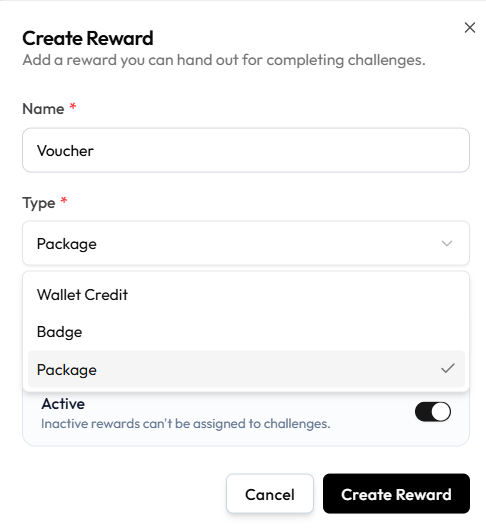
On Create Reward, Type has three options:
| Type on the form | Label on the list | What the member receives | Best used for |
|---|---|---|---|
| Wallet Credit | Wallet | Monetary value in the Wallet | Flexible value |
| Badge | — | Recognition. See Badges | Milestones |
| Package | Package | A Package | A major achievement |
Do not treat one type as always better.
Inactive rewards cannot be assigned to challenges. The create form says: Inactive rewards can’t be assigned to challenges.
When a Reward Is Awarded
Attach rewards on the challenge Rewards step. The copy there is: Choose rewards from your catalog to award when participants complete this challenge.
Automatic awarding at the exact moment the target is reached is not confirmed.
Wallet-credit rewards are not the same as Manually Adding Money to a Wallet.
Creating a Package Reward
A Package reward gives the member a Package when they complete the challenge.
Use it for a substantial prize — extra sessions or a complimentary pack, not only a badge.
Example
Complete the September Strength Challenge and receive a complimentary package from your catalog, such as FREE ONE TIME RIDE.
Whether Fitnez Studio assigns a new held package, grants access another way, or only records the reward is not confirmed.
Workflow — Create a Package Reward
Reward → + Create Reward → Type Package → Select Package → Create Reward
Step 1 — Open Reward
Open Studio → Manage Events → Reward, then + Create Reward.
The modal title is Create Reward. The subtitle is: Add a reward you can hand out for completing challenges.
Step 2 — Name the Reward
Enter Name, such as Voucher.
Step 3 — Choose Package
Set Type to Package. A Package field appears.
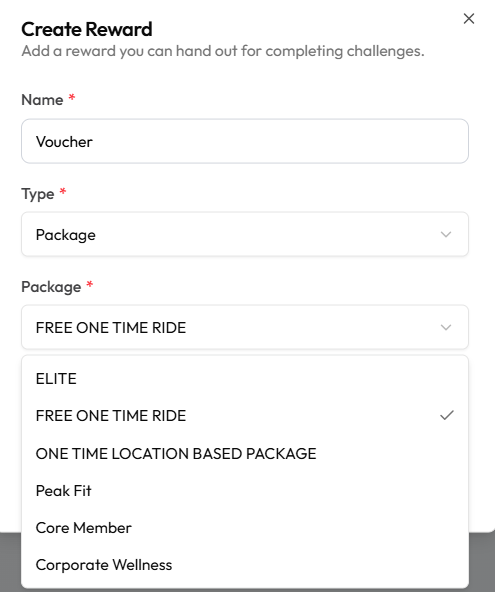
Pick the package, such as FREE ONE TIME RIDE. Other names on this list include ELITE, Peak Fit, and Core Member.
Step 4 — Set Active and Save
Leave Active on if this reward should be assignable. Help text: Inactive rewards can’t be assigned to challenges.
Click Create Reward, or Cancel. Then Attach It to the challenge.
Assigning a package by hand (not as a challenge prize) is documented on Assign a Package.
Creating a Wallet-Credit Reward
A Wallet Credit reward adds Wallet money when the member completes the challenge.
Use it when the prize should be spendable value, not extra sessions and not only a badge.
Example
Complete the challenge and receive 100 QAR wallet credit — as on FITNESS CHAMPION VOUCHER.
Reward Credit Versus a Manual Wallet Change
| Challenge wallet reward | Manual wallet change |
|---|---|
| Created under Reward as type Wallet Credit | Staff add or deduct balance on the member |
| Attached on the challenge Rewards step | Done from the Wallet |
| Must be Active to assign | May require Approval |
Do not describe a challenge prize as a manual adjustment.
Workflow — Create Wallet-Credit Reward
Reward → + Create Reward → Wallet Credit → Enter Amount → Create Reward
Step 1 — Open Reward
Open Studio → Manage Events → Reward, then + Create Reward.
Step 2 — Choose Wallet Credit
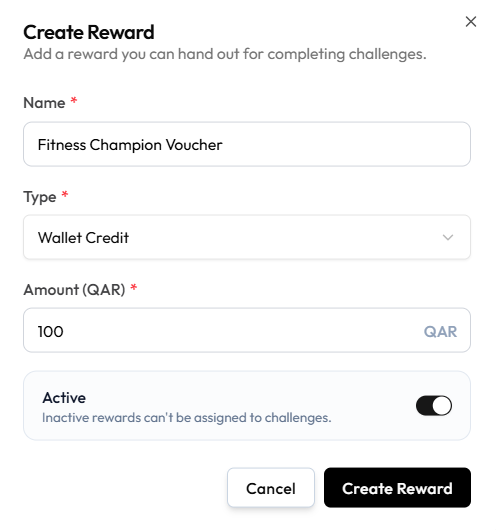
Enter Name, such as Fitness Champion Voucher. Set Type to Wallet Credit.
Step 3 — Enter the Amount
Amount (QAR) is required. The example is 100.
The currency on this form is QAR. That is the studio currency on screen, not a rule that every location uses QAR.
Step 4 — Set Active and Save
Leave Active on so the reward can be assigned. Help text: Inactive rewards can’t be assigned to challenges.
Click Create Reward. Then Attach It to the challenge.
What happens on the member’s wallet when they earn it — instant credit, pending Approval, or a ledger line — is not shown.
Creating a Badge Reward
A Badge reward grants a Badge when the member completes the challenge.
Use it for milestones and recognition, such as a fitness streak.
Create the badge first under Badges if you need new artwork. See Creating a Badge.
Example
Complete 20 sessions in 30 days → Earn the Fitness Streak badge.
Workflow — Create Badge Reward
Reward → + Create Reward → Type Badge → Create Reward
Step 1 — Open Reward
Open Studio → Manage Events → Reward, then + Create Reward.
Step 2 — Choose Badge
Enter a Name. Set Type to Badge. The Type list is Wallet Credit, Badge, and Package.
Step 3 — Finish the Form
Leave Active on if the reward should be assignable.
There is no screenshot of Create Reward after Badge is selected. Extra fields (which badge to grant) are not confirmed. Screenshot to add: Create Reward with Type Badge and the badge picker, if it appears.
Step 4 — Save and Attach
Click Create Reward, then Attach It on the challenge Rewards step.
When the badge appears for the member is documented on How Members Earn & See Their Badges. Automatic awarding is not confirmed.
Attaching Rewards to an Event
Attach rewards on the Rewards step of a Challenge Event.
The instruction on that step is: Choose rewards from your catalog to award when participants complete this challenge. Select one or more rewards to award and assign each a tier. Lower tiers are awarded first.
You can attach one or more rewards. Lower tiers are awarded first.
If There Are No Rewards Yet
If the catalog is empty, the Rewards step shows No rewards yet.
The extra line is: Create rewards in the Rewards section first, then come back to award them as challenge rewards.
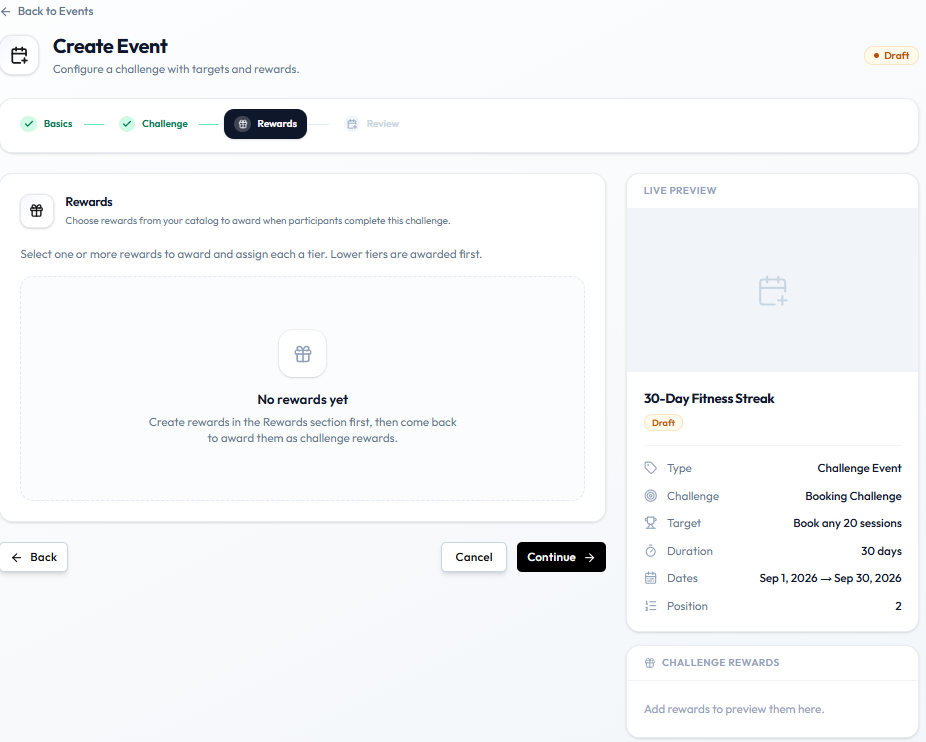
LIVE PREVIEW still says Add rewards to preview them here.
Create items on Rewards, then return to this step.
Workflow — Attach Reward to Challenge
Challenge → Rewards → Select reward → Assign tier → Continue
Step 1 — Open the Challenge
On Create Event, finish Basics and Challenge, then open Rewards. Or Edit an existing challenge and go to the same step.
Step 2 — Create Rewards If Needed
If you see No rewards yet, open Studio → Manage Events → Reward and Create a Reward.
The reward must be Active. Inactive rewards cannot be assigned to challenges.
Step 3 — Select Rewards and Tiers
Choose one or more catalog rewards and assign each a tier. Lower tiers are awarded first.
Step 4 — Continue
Click Continue to Review, then save.
There is no screenshot of the Rewards step after rewards exist (picker, tiers, preview). Screenshot to add: Rewards step with at least one reward selected and a tier assigned.
When the Reward Becomes Eligible
The step copy says rewards are awarded when participants complete this challenge. Exact timing and automatic grant are not confirmed.
Editing or Deleting a Reward
Edit a reward when the package, amount, or badge should change. Delete it when it should not be offered any more.
There is no screenshot of reward edit, delete, or a confirmation. Whether you can change a reward that is already on an Active challenge is not confirmed. Screenshot to add: Reward list with edit/delete; confirmation; a reward already attached to a challenge.
Edit
Step 1 — Find the Reward
Open Studio → Manage Events → Reward.
Step 2 — Open Details
Open the reward Fitnez Studio shows.
Step 3 — Change and Save
Update the name, package, amount, or badge, then save.
If the reward is already on a live challenge, check Fitnez Studio before you change the prize. Do not assume in-progress members keep the old or new value.
Delete
Step 1 — Find the Reward
Open Reward.
Step 2 — Delete
Use the delete action if it is there.
Step 3 — Confirm
Read the confirmation. What happens to challenges that already use the reward is not shown.