Filter Activity by Date Range
The date picker is on Dashboard → Overview, not a separate Activity Feed filter.
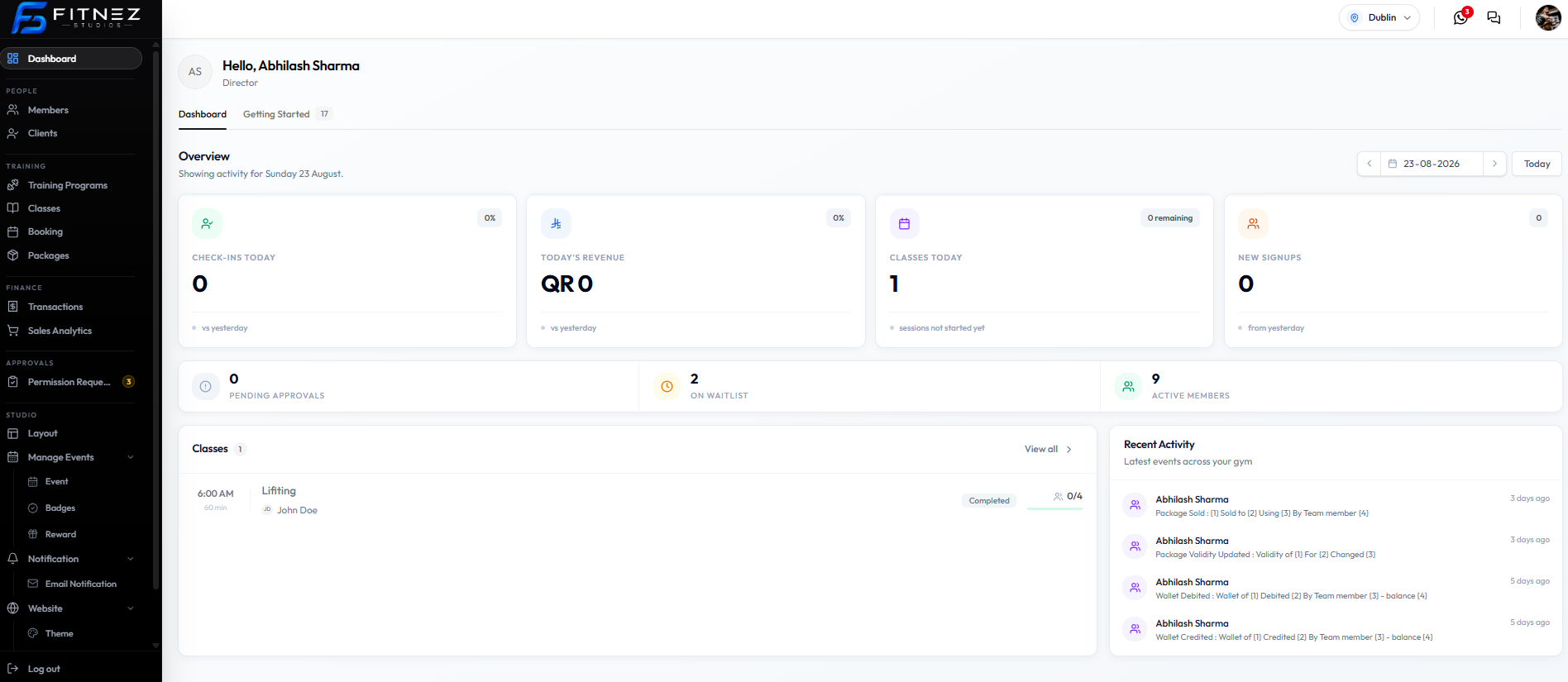
| Control | What it does on this screenshot |
|---|---|
| Date field (for example 23-08-2026) | Selects the Overview day |
| Arrows | Move one day |
| Today | Return to today |
| Heading | Can read Showing activity for Sunday 23 August |
That selection updates Overview cards and the Classes list (for example Lifting on that day).
On the 24-08-2026 and 23-08-2026 captures, Recent Activity still shows the same four rows with 3 days ago and 5 days ago. So this date control is for the Dashboard day, not a confirmed filter that rebuilds the Recent Activity list.
Step 1 — Open Dashboard
Step 2 — Change the Overview date
Pick a day or click Today.
Step 3 — Read Overview and Classes
Check Classes Today, Today’s Classes / Classes, and Recent Activity separately.
All Bookings has its own Pick a date range. That is a bookings filter, not Recent Activity.
Related Articles
Last updated on