Event Statuses
Status tells staff whether an event is live. On the Events list it is a pill in the STATUS column. On Create Event and Edit Event it is a dropdown under Event Details.
The dropdown includes a Search… box. The options are Draft, Active, Inactive, and Completed.
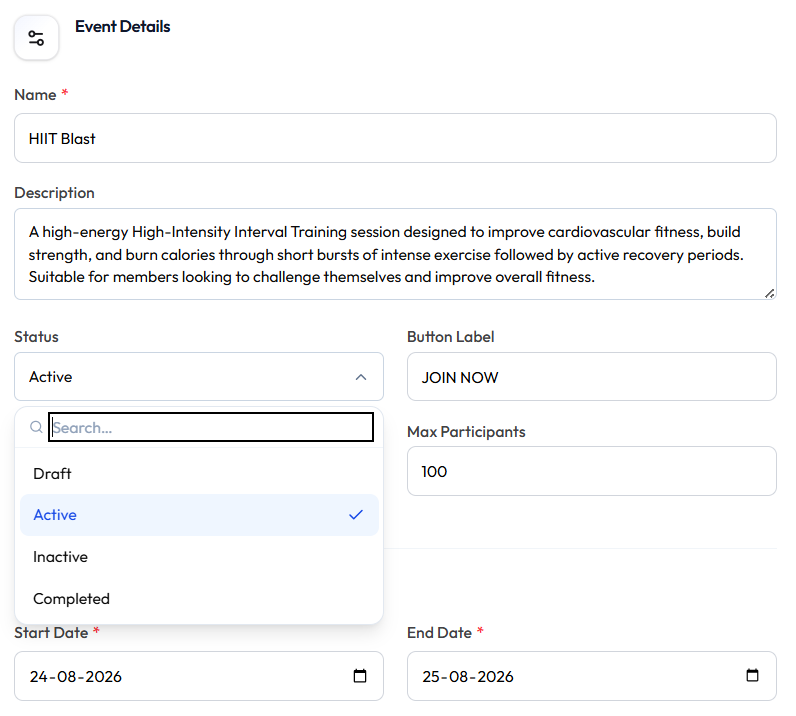
| Status | Meaning | Typical use |
|---|---|---|
| Draft | Still being prepared | Configure before launch |
| Active | Live on the Events list in the current screenshot | Members can see the event according to product rules |
| Inactive | No longer active | Stop the event without deleting the row |
| Completed | Finished | After the campaign or dates have ended |
What members can see or do in each status — for example whether JOIN NOW works — is not shown.
A status badge also sits next to the Create Event / Edit Event title (Active or Draft in the current screenshots).
Keep an Event in Draft
Set Status to Draft while you finish the name, dates, banner, and (for a challenge) type, target, and rewards. Switch to Active when the event should go live.
Challenge create in the screenshots uses Draft.
Deactivate an Event
Workflow — Deactivate: Event → Edit → Status → Inactive → Update Event
Use Inactive when you want to stop the event but keep the record. Use Delete Event only when the event should leave the list.
This is the same Status control on create and edit. A separate list-only screenshot is not needed.