Checking What You Are Allowed to Do
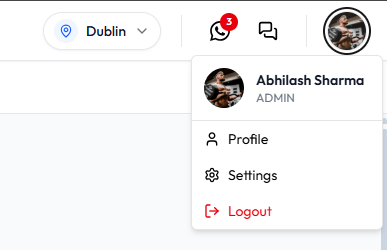
User profile does not show a permission list. What you can see yourself is your role on the header photo menu.
Role Versus Permission
| Concept | On the dashboard |
|---|---|
| Role | Under your name in the header menu (for example Sophie Bennett as ADMIN in Dublin). On People → Members, badges include Admin, Staff, and Trainer. |
| Permission | A named action, shown as a key such as booking.view. The ADMIN screenshot lists 91 keys under Permission keys. |
| Location | The site in the header (SELECT LOCATION). See Switching Between Locations. |
You cannot turn permission keys on or off from User profile. An administrator assigns your role when they add you as a team member.
How to See Your Role
- Click your photo in the header.
- Read the line under your name.
Admin Permission Keys
This screenshot is the ADMIN role: role_key admin, role_name ADMIN, permissions count 91. Heading: Permission keys.
It is not a screen on User profile. You cannot edit the keys yourself.
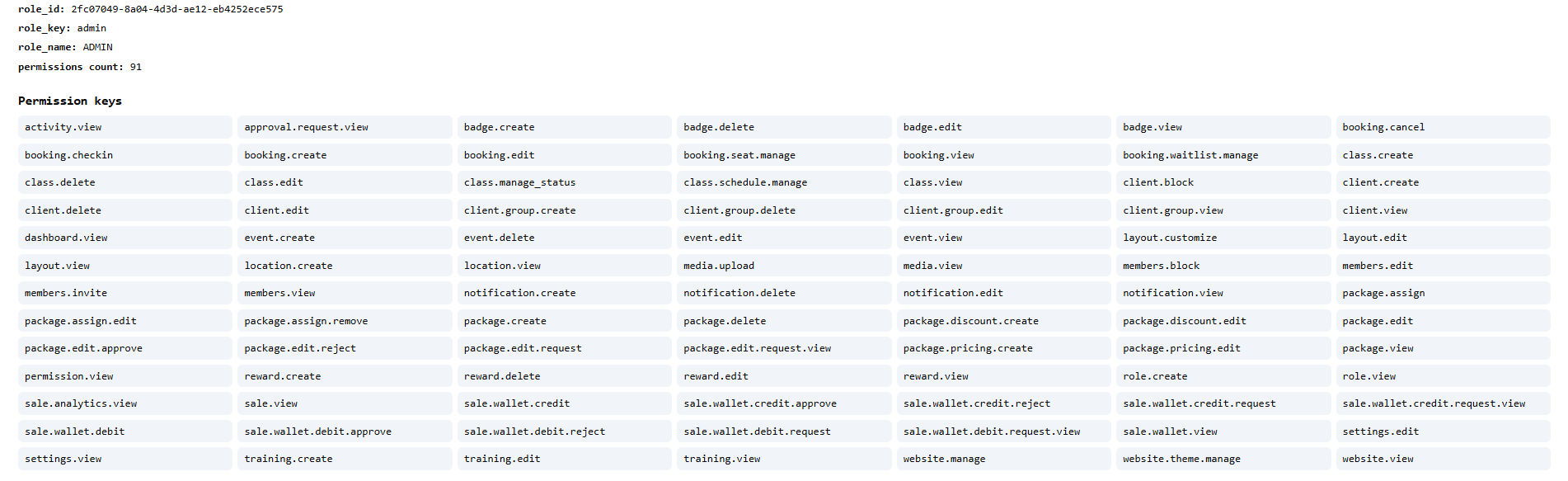
Keys on that screenshot are grouped by area. Examples:
| Area | Keys on the screenshot (examples) |
|---|---|
| Dashboard and activity | dashboard.view, activity.view |
| Bookings | booking.view, booking.create, booking.edit, booking.cancel, booking.checkin, booking.seat.manage, booking.waitlist.manage |
| Classes | class.view, class.create, class.edit, class.delete, class.manage_status, class.schedule.manage |
| Clients | client.view, client.create, client.edit, client.delete, client.block, client.group.view, client.group.create, client.group.edit, client.group.delete |
| Staff (Members) | members.view, members.invite, members.edit, members.block |
| Packages | package create, edit, delete, assign, discount, pricing, and package.edit request / approve / reject |
| Sales and wallet | sale.analytics.view, sale.wallet.view, wallet credit and debit including request / approve / reject |
| Approvals | approval.request.view |
| Events, badges, rewards | event, badge, and reward view / create / edit / delete |
| Notifications | notification.view, notification.create, notification.edit, notification.delete |
| Training programs | training.view, training.create, training.edit |
| Locations and media | location.view, location.create, media.view, media.upload |
| Layout | layout.view, layout.edit, layout.customize |
| Settings and website | settings.view, settings.edit, website.view, website.manage, website.theme.manage |
| Roles | role.view, role.create, role.edit, permission.view |
For example, Sophie Bennett as ADMIN in Dublin can use the keys on this list. Daniel Murphy as STAFF does not use this same list.
If you cannot complete a money change yourself (for example some wallet credits), use Approval Requests.
Do not try to grant yourself extra keys. Ask an authorised administrator to change your role on Team Members.