Bookings & Package Credits
A package is what a client buys. A session on that package is what they use when you book them into a class. See Packages.
On Training → Classes, some classes show a PACKAGE badge. On All Bookings, PAYMENT can show Package. On Today’s Schedule, an attendee row can show package.
When You Book from Today’s Schedule
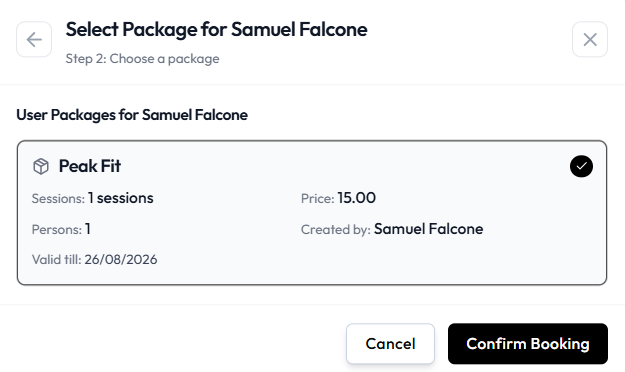
Book a Member Step 2 is Choose a package.
If the client already holds a package, select it (for example Peak Fit with sessions and valid till), then Confirm Booking.
If they have none:
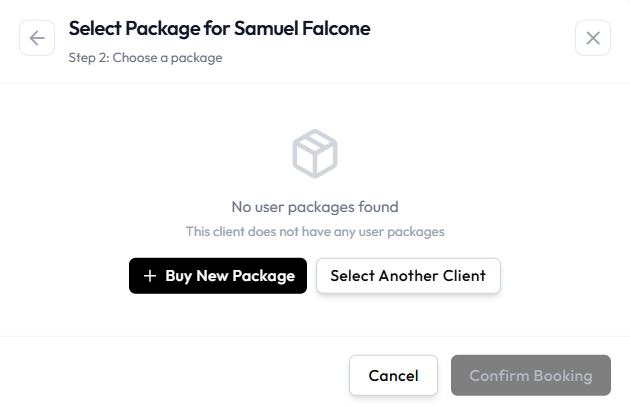
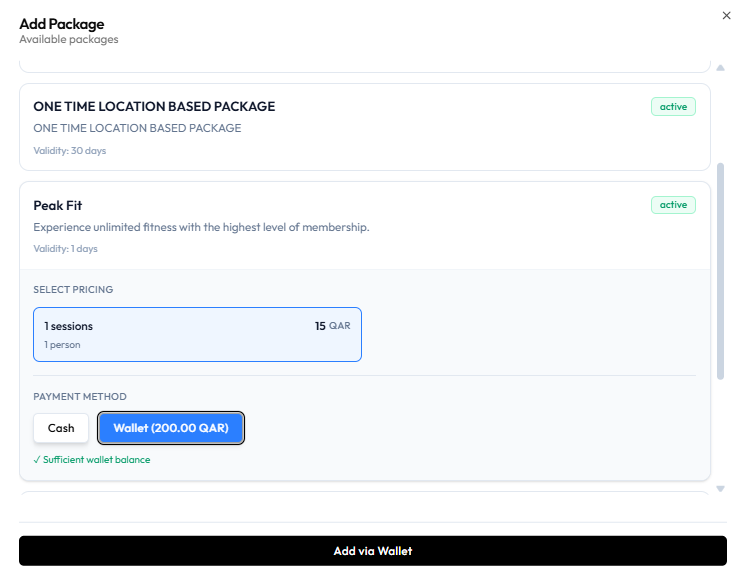
Use + Buy New Package, choose pricing and Cash or Wallet, then add the package (for example Add via Wallet when balance is sufficient).
Confirm Booking stays unavailable until a package is selected.
These screens show package selection and purchase at booking time. The exact moment a session count decreases after Confirm Booking is not labelled separately on the captures.
After Cancellation
What happens to remaining sessions when you cancel is not confirmed. Do not assume the session is returned or kept.