One-time Packages vs Recurring Memberships
Choose how members can buy the package on Create Package Step 2 — Purchase Type.
What You Choose on Create Package
Heading: HOW CAN USERS BUY THIS PACKAGE?
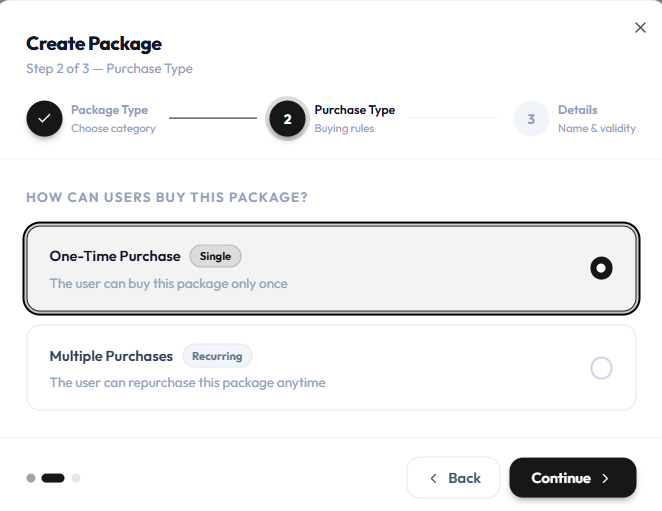
| Option | Badge | Helper text | Label on the catalogue |
|---|---|---|---|
| One-Time Purchase | Single | The user can buy this package only once | ONE TIME |
| Multiple Purchases | Recurring | The user can repurchase this package anytime | RECURRING |
What You See on the Catalogue
| Label | Examples |
|---|---|
| RECURRING | ELITE, Peak Fit, Corporate Wellness |
| ONE TIME | FREE ONE TIME RIDE, ONE TIME LOCATION BASED PACKAGE |
On Edit Package, Package Type can show One Time with help text: Single purchase with fixed validity and no auto-renewal.
How to Choose
| You want | Use |
|---|---|
| A class pack or single session the member buys once | One-Time Purchase / ONE TIME |
| An offer the member can buy again | Multiple Purchases / RECURRING |
The create step describes recurring as repurchase anytime. How automatic billing or renewal works after purchase is not shown on these screenshots.
Related Articles
Last updated on