View All Schedules
Use Scheduled Classes to review repeating timetables — drop date, countdown, class count, and status — before you pause or add sessions.
Where to Look
Open Training → Classes, then Scheduled Classes.
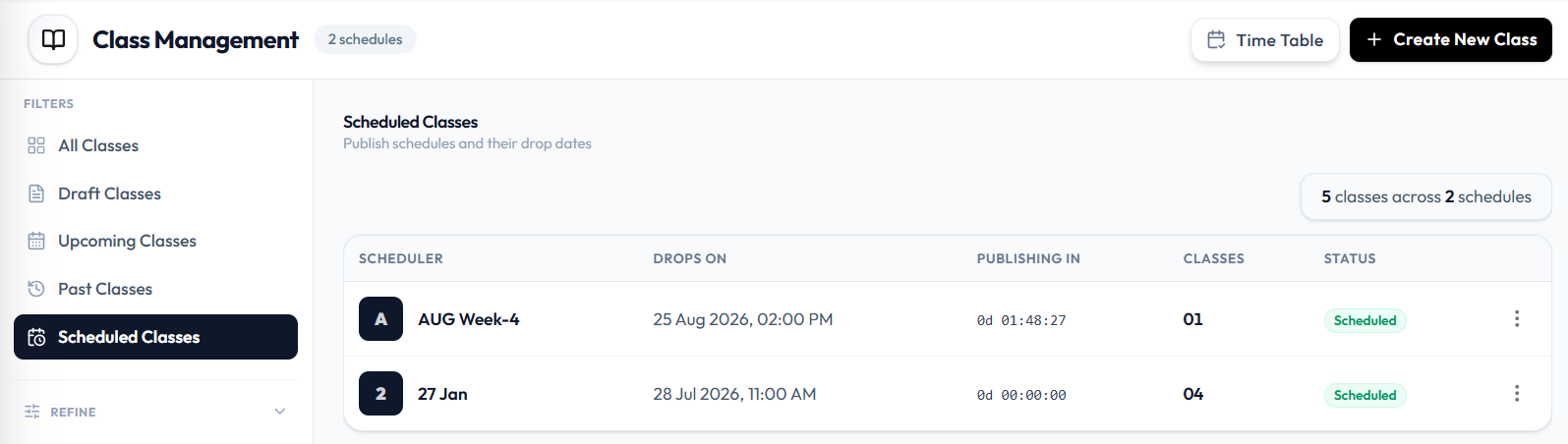
The heading is Scheduled Classes. The subtitle is: Publish schedules and their drop dates. A summary badge can show 4 classes across 1 schedule.
What You See
| Column | What it is |
|---|---|
| SCHEDULER | The timetable identifier, such as 2 and 27 Jan |
| DROPS ON | When the classes become available, such as 28 Jul 2026, 11:00 AM |
| PUBLISHING IN | A countdown, such as 0d 00:00:00. A paused schedule shows — |
| CLASSES | How many classes are in the schedule, such as 04 |
| STATUS | Scheduled or Paused |
| ⋯ | Actions for that schedule |
REFINE on this filter is the same as the class list: Trainer, Program, and Location.
The schedule row menu (⋯) is not open in this screenshot. This page does not list the menu labels.
Related Articles
Last updated on