Top-Selling Packages
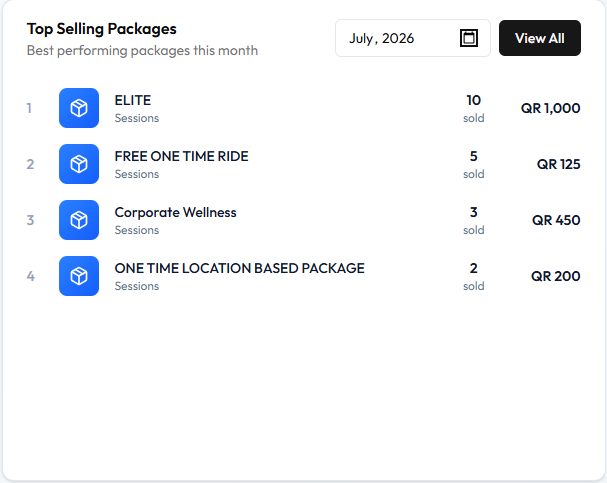
Top Selling Packages shows packages that sold most in the selected month. The subtitle is Best performing packages this month.
The month on this screenshot is July, 2026. View All is on the card. It does not open another page. Clicking a package row does not open the catalogue.
Ranking on this screen
Rows are ordered by units sold, not by revenue.
On this screenshot FREE ONE TIME RIDE has 5 sold / QR 125 (rank 2). Corporate Wellness has 3 sold / QR 450 (rank 3) — more money, fewer units, so it ranks lower.
| Rank | Package | Type on screen | Sold | Revenue |
|---|---|---|---|---|
| 1 | ELITE | Sessions | 10 sold | QR 1,000 |
| 2 | FREE ONE TIME RIDE | Sessions | 5 sold | QR 125 |
| 3 | Corporate Wellness | Sessions | 3 sold | QR 450 |
| 4 | ONE TIME LOCATION BASED PACKAGE | Sessions | 2 sold | QR 200 |
Those names match offers on Packages. Type Sessions is the label under each name on this card.
Refunds and cancelled sales are not mentioned. The chart icon on a package card is a different entry point — see Package Performance.
Workflow — Find top-selling packages
- Finance → Sales Analytics.
- Scroll to Top Selling Packages.
- Select the month.
- Read sold for volume and QR for money.
Related Articles
Last updated on