Add Classes to a Schedule
Add classes to an existing schedule when you need extra sessions on a timetable that is already running — for example a one-off Saturday Cycling class on top of the weekday pattern.
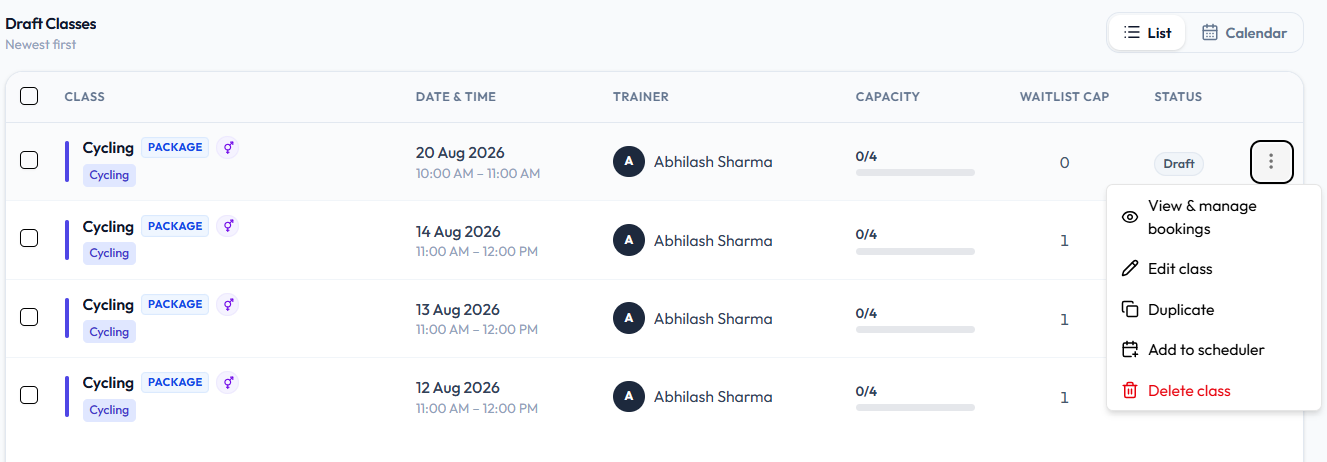
On a Draft class, the row menu includes Add to scheduler.
That action is not on an Upcoming class menu.
Steps
Step 1 — Find a draft class
Open Training → Classes, then Draft Classes.
Step 2 — Choose Add to scheduler
Open ⋯ and click Add to scheduler.
You can also open the timetable from Scheduled Classes.
Step 3 — Save
Complete the scheduler screen Fitnez Studio opens so the class is counted under CLASSES on that schedule.
There is no screenshot of the scheduler after Add to scheduler. This guide does not describe whether extra classes stay linked to the schedule or which dates you can add.
You can also create a single class if the extra session should not belong to the timetable.