Edit or End a Discount
Edit a discount when the name, percentage, or dates should change. Stop using it on a plan when the promotion should no longer apply.
On Edit Package → Pricing, the Discount field has an Edit (pencil) control next to + Add Discount.
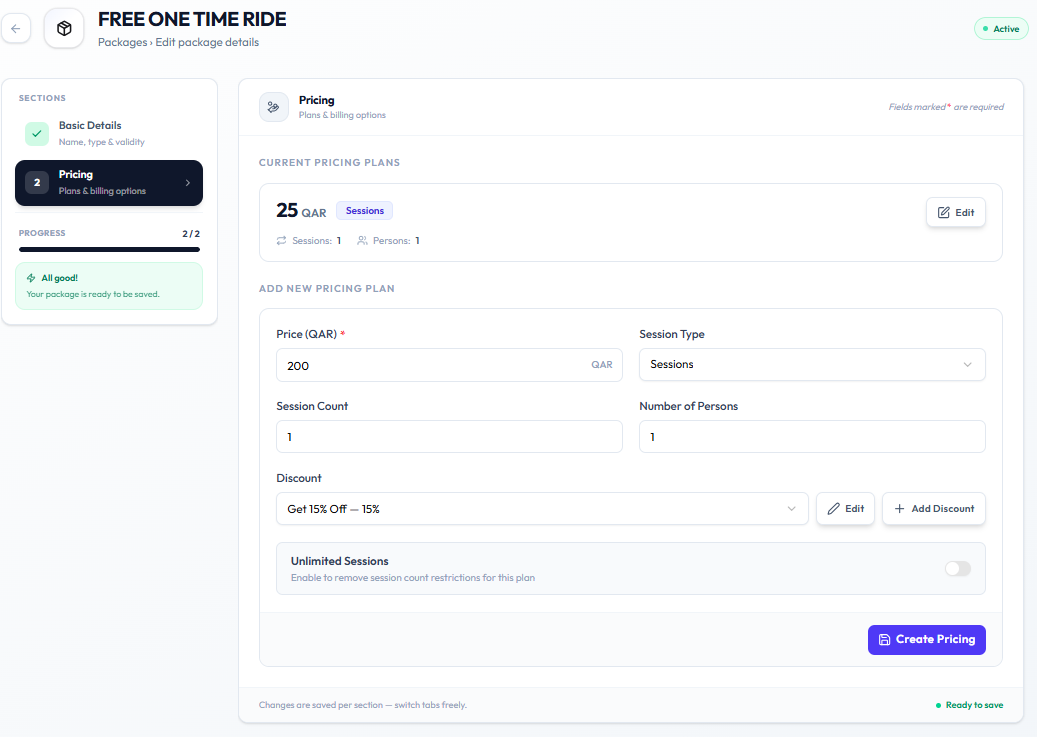
Edit
Step 1 — Open Pricing
Open Training → Packages → Edit Package → Pricing.
Step 2 — Edit the discount
Click the pencil Edit control next to Discount, or open the discount you need to change.
Update the fields Fitnez Studio shows — the create form uses Discount Name, Discount Type, Discount %, Valid From, Valid Until, and Description. See Create a Discount.
The full edit-discount window is not captured separately. Use the labels on Create New Discount as the confirmed field names until an edit screenshot is added.
Step 3 — Save
Save the change using the action on screen.
Stop Using a Discount on a Plan
Step 1 — Open the pricing plan
Open Pricing for the package.
Step 2 — Clear or change Discount
Select a different discount, or clear the Discount field if Fitnez Studio allows that.
Step 3 — Save the plan
Save so the plan no longer uses that reduction.
Do not assume ending a discount deletes the package or changes remaining sessions on a member.