Creating a Wallet-Credit Reward
A Wallet Credit reward adds wallet money when the member completes the challenge.
Use it when the prize should be spendable value, not extra sessions and not only a badge.
Example
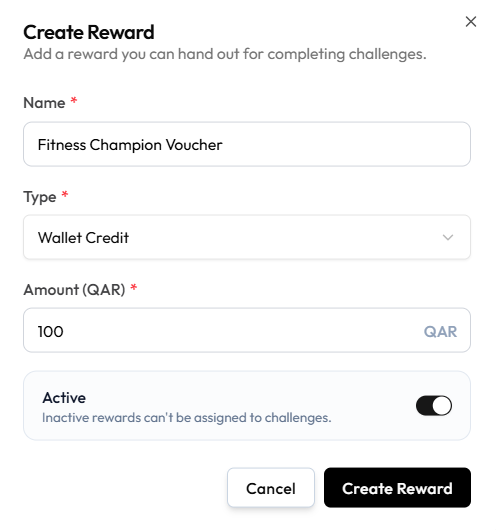
Complete the challenge and receive 100 QAR wallet credit — as on FITNESS CHAMPION VOUCHER.
Reward Credit versus a Manual Wallet Change
| Challenge wallet reward | Manual wallet change |
|---|---|
| Created under Reward as type Wallet Credit | Staff add or deduct balance on the member |
| Attached on the challenge Rewards step | Done from the wallet |
| Must be Active to assign | May require approval |
Do not describe a challenge prize as a manual adjustment.
Workflow — Create Wallet-Credit Reward
Reward → + Create Reward → Wallet Credit → Enter Amount → Create Reward
Step 1 — Open Reward
Open Studio → Manage Events → Reward, then + Create Reward.
Step 2 — Choose Wallet Credit
Enter Name, such as Fitness Champion Voucher. Set Type to Wallet Credit.
Step 3 — Enter the amount
Amount (QAR) is required. The example is 100.
The currency on this form is QAR. That is the studio currency on screen, not a rule that every location uses QAR.
Step 4 — Set Active and save
Leave Active on so the reward can be assigned. Help text: Inactive rewards can’t be assigned to challenges.
Click Create Reward. Then attach it to the challenge.
What happens on the member’s wallet when they earn it — instant credit, pending approval, or a ledger line — is not shown.