Booking-Based Challenges
A Booking Challenge rewards members for completing bookings. It is not a Package Challenge.
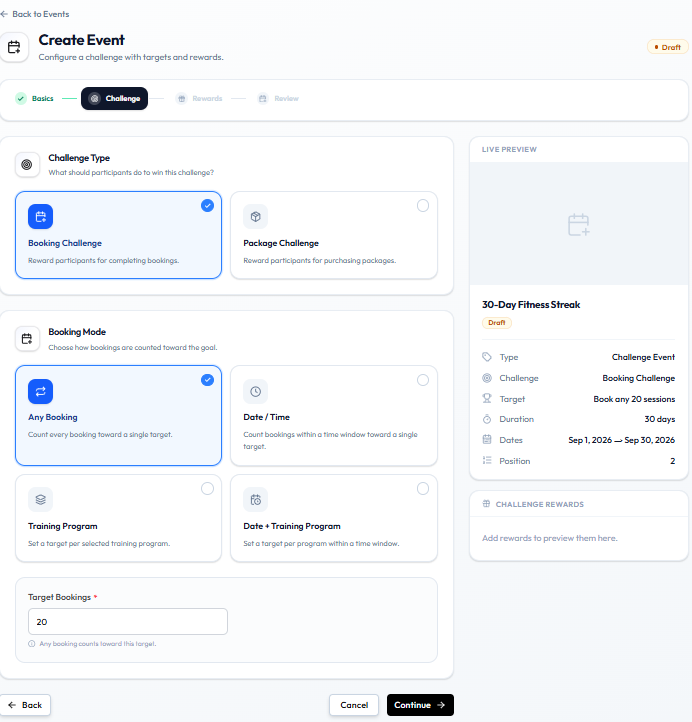
On the Challenge step, Challenge Type Booking Challenge is described as: Reward participants for completing bookings.
Booking Mode
When Booking Challenge is selected, Booking Mode has four cards:
| Booking Mode | Description on the card |
|---|---|
| Any Booking | Count every booking toward a single target. |
| Date / Time | Count bookings within a time window toward a single target. |
| Training Program | Set a target per selected training program. |
| Date + Training Program | Set a target per program within a time window. |
Any Booking is selected in this screenshot.
Target
Target Bookings is required. The example value is 20.
The help text for Any Booking is: Any booking counts toward this target.
LIVE PREVIEW shows Target: Book any 20 sessions.
The challenge dates still come from Basics (Start Date and End Date), such as 1–30 September.
Examples
Any Booking
Attend any 12 eligible classes during September.
On the form: Booking Challenge → Any Booking → Target Bookings 12 → Basics dates in September.
Emma Wilson in Dublin books any class. Each booking counts toward the one target.
Training Program
Complete 8 strength-training bookings during September.
Choose Training Program. The card says you set a target per selected training program. The program picker itself is not in this screenshot.
Date / Time
Complete 5 eligible bookings between 1 September and 15 September.
Choose Date / Time. Basics already has a start and end date. Extra time-window fields for this mode are not in this screenshot.