Viewing Purchases
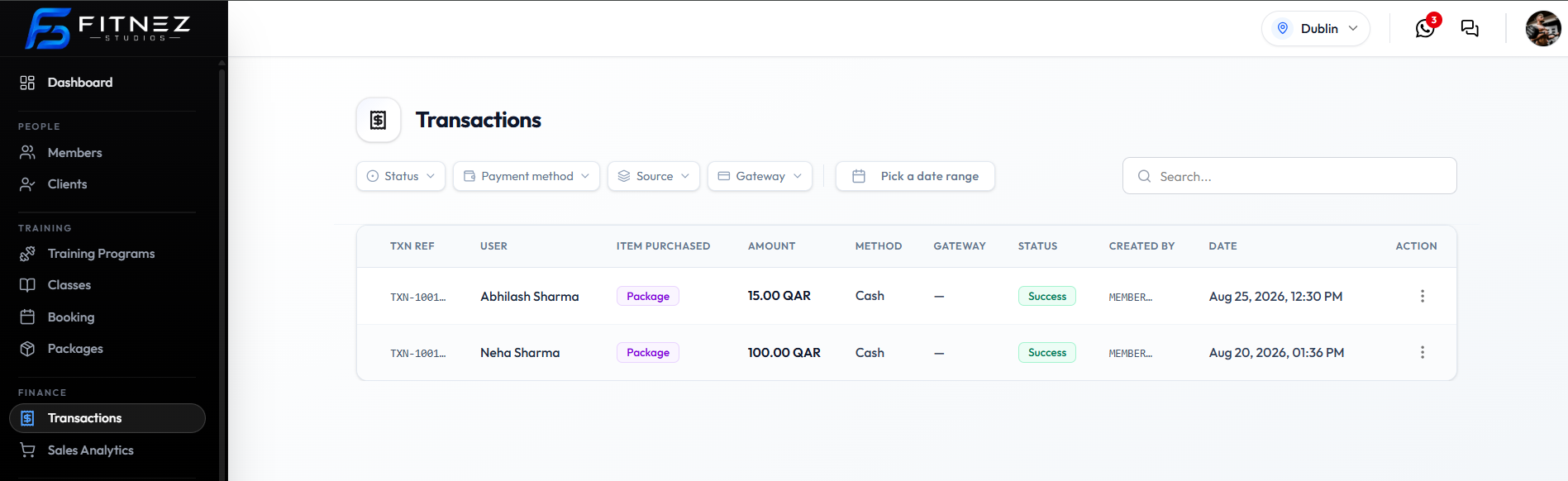
A purchase on the ledger is usually a package sale. On Finance → Transactions, those rows show ITEM PURCHASED as Package.
The payment attempt is the same row’s STATUS, METHOD, and AMOUNT.
Where to Look
| Place | What to use |
|---|---|
| Finance → Transactions | Filter Source → Package, or read ITEM PURCHASED |
| People → Clients | Member profile; held packages are under Packages on a Member |
Workflow — Find a Package Purchase
Step 1 — Open Transactions
Finance → Transactions.
Step 2 — Narrow the list
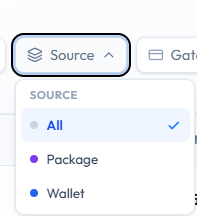
Set Source → Package, and optionally Status → Success, a date range, or Search… for the client name.
Step 3 — Review the row
| Column | Check |
|---|---|
| USER | Client |
| ITEM PURCHASED | Package |
| AMOUNT | Charge in QAR |
| METHOD | Cash or Gateway |
| STATUS | Preferably Success |
| DATE | When it was bought |
Step 4 — Invoice if needed
⋯ → Download invoice or Send invoice. See Downloading an Invoice.
Purchase versus Held Package
| Record | What it is for |
|---|---|
| Transaction (ITEM PURCHASED: Package) | The buy event and payment |
| Held package | Remaining sessions and validity for that member |
A Success package transaction should typically mean the member can use the package. Confirm access on Packages a Member Holds.
Related Articles
Last updated on