Creating a Package Reward
A Package reward gives the member a package when they complete the challenge.
Use it for a substantial prize — extra sessions or a complimentary pack, not only a badge.
Example
Complete the September Strength Challenge and receive a complimentary package from your catalog, such as FREE ONE TIME RIDE.
Whether Fitnez Studio assigns a new held package, grants access another way, or only records the reward is not confirmed.
Workflow — Create a Package Reward
Reward → + Create Reward → Type Package → Select Package → Create Reward
Step 1 — Open Reward
Open Studio → Manage Events → Reward, then + Create Reward.
The modal title is Create Reward. The subtitle is: Add a reward you can hand out for completing challenges.
Step 2 — Name the reward
Enter Name, such as Voucher.
Step 3 — Choose Package
Set Type to Package. A Package field appears.
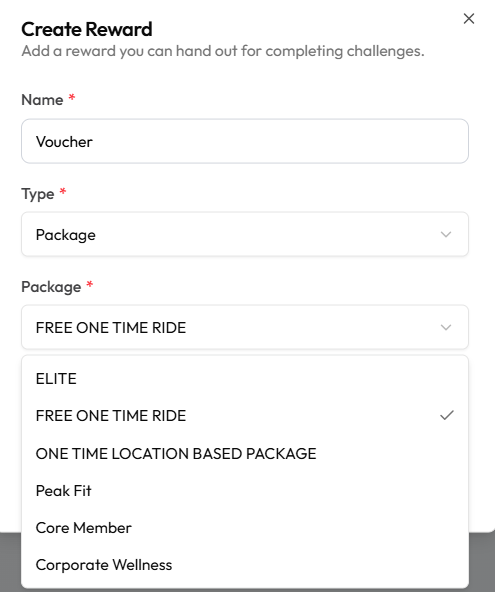
Pick the package, such as FREE ONE TIME RIDE. Other names on this list include ELITE, Peak Fit, and Core Member.
Step 4 — Set Active and save
Leave Active on if this reward should be assignable. Help text: Inactive rewards can’t be assigned to challenges.
Click Create Reward, or Cancel. Then attach it to the challenge.
Assigning a package by hand (not as a challenge prize) is documented on Assign a Package.